




组网需求
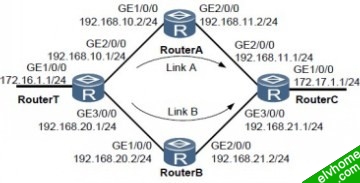
如图1-1所示,现网环境中有4台路由器,每个路由器上都配置了OSPF路由协议。现要求从RouterT到RouterC有两条路由可达,并且其中一条为另一条的备份链路。当主链路出现故障时,流量可以快速切换到备份链路上,从而保证业务从RouterT到RouterC的正常
转发。
图1-1 配置公网IPv4 FRR 功能组网图
配置思路
采用如下的思路配置公网IP FRR功能:
1. 在RouterT和RouterC的GE3/0/0接口上配置运行OSPF协议所需的开销值,使OSPF优选链路A作为主链路。
2. 在RouterT上配置路由策略,并在使能公网IP FRR功能时运用该策略,使得链路B被设置为链路A的备份链路。
操作步骤
步骤1 配置各接口的IP地址
# 在RouterT上配置接口IP地址。
system-view
[Huawei] sysname RouterT
[RouterT] interface gigabitethernet 1/0/0
[RouterT-GigabitEthernet1/0/0] ip address 172.16.1.1 24
[RouterT-GigabitEthernet1/0/0] quit
[RouterT] interface gigabitethernet 2/0/0
[RouterT-GigabitEthernet2/0/0] ip address 192.168.10.1 24
[RouterT-GigabitEthernet2/0/0] quit
[RouterT] interface gigabitethernet 3/0/0
[RouterT-GigabitEthernet3/0/0] ip address 192.168.20.1 24
[RouterT-GigabitEthernet3/0/0] quit
RouterA、RouterB和RouterC的配置与RouterT类似(略)
步骤2 在RouterT、RouterA、RouterB和RouterC上配置OSPF路由协议
# 配置RouterT。
[RouterT] ospf
[RouterT-ospf-1] area 0
[RouterT-ospf-1-area-0.0.0.0] network 172.16.1.0 0.0.0.255
[RouterT-ospf-1-area-0.0.0.0] network 192.168.10.0 0.0.0.255
[RouterT-ospf-1-area-0.0.0.0] network 192.168.20.0 0.0.0.255
[RouterT-ospf-1-area-0.0.0.0] quit
# 配置RouterA。
[RouterA] ospf
[RouterA-ospf-1] area 0
[RouterA-ospf-1-area-0.0.0.0] network 192.168.10.0 0.0.0.255
[RouterA-ospf-1-area-0.0.0.0] network 192.168.11.0 0.0.0.255
[RouterA-ospf-1-area-0.0.0.0] quit
# 配置RouterB。
[RouterB] ospf
[RouterB-ospf-1] area 0
[RouterB-ospf-1-area-0.0.0.0] network 192.168.20.0 0.0.0.255
[RouterB-ospf-1-area-0.0.0.0] network 192.168.21.0 0.0.0.255
[RouterB-ospf-1-area-0.0.0.0] quit
# 配置RouterC。
[RouterC] ospf
[RouterC-ospf-1] area 0
[RouterC-ospf-1-area-0.0.0.0] network 172.17.1.0 0.0.0.255
[RouterC-ospf-1-area-0.0.0.0] network 192.168.11.0 0.0.0.255
[RouterC-ospf-1-area-0.0.0.0] network 192.168.21.0 0.0.0.255
[RouterC-ospf-1-area-0.0.0.0] quit
步骤3 配置OSPF接口的Cost值
# 在RouterT的GE3/0/0接口上配置Cost值,使OSPF优选链路A作为主链路。
[RouterT] interface gigabitethernet 3/0/0
[RouterT-GigabitEthernet3/0/0] ospf cost 100
[RouterT-GigabitEthernet3/0/0] quit
# 在RouterC的GE3/0/0接口上配置Cost值,使OSPF优选链路A作为主链路。
[RouterC] interface gigabitethernet 3/0/0
[RouterC-GigabitEthernet3/0/0] ospf cost 100
[RouterC-GigabitEthernet3/0/0] quit
步骤4 配置路由策略
# 在RouterT上配置路由策略,包括配置备份下一跳和备份出接口以及配置if-match项来限制应用范围。
[RouterT] ip ip-prefix frr1 permit 172.17.1.1 24
[RouterT] route-policy ip_frr_rp permit node 10
[RouterT-route-policy] if-match ip-prefix frr1
[RouterT-route-policy] apply backup-nexthop 192.168.20.2
[RouterT-route-policy] apply backup-interface gigabitethernet 3/0/0
[RouterT-route-policy] quit
步骤5 在RouterT上使能公网IP FRR功能
[RouterT] ip frr route-policy ip_frr_rp
步骤6 # 在RouterT上查看备份出接口和备份下一跳信息。
display ip routing-table 172.17.1.0 verbose
Route Flags: R - relay, D - download to fib
------------------------------------------------------------------------------
Routing Table : Public
Summary Count : 1
Destination: 172.17.1.0/24
Protocol: OSPF Process ID: 1
Preference: 10 Cost: 3
NextHop: 192.168.10.2 Neighbour: 0.0.0.0
State: Active Adv Age: 00h06m49s
Tag: 0 Priority: low
Label: NULL QoSInfo: 0x0
IndirectID: 0x0
RelayNextHop: 0.0.0.0 Interface: GigabitEthernet2/0/0
TunnelID: 0x0 Flags: D
BkNextHop: 192.168.20.2 BkInterface: GigabitEthernet3/0/0
BkLabel: NULL SecTunnelID: 0x0
BkPETunnelID: 0x0 BkPESecTunnelID: 0x0
BkIndirectID: 0x0
步骤7 当不需要IP FRR功能时,配置undo ip frr命令进行去使能操作
[RouterT] undo ip frr
步骤8 # IP FRR去使能后,查看备份出接口和备份下一跳的信息。
display ip routing-table 172.17.1.0 verbose
Route Flags: R - relay, D - download to fib
------------------------------------------------------------------------------
Routing Table : Public
Summary Count : 1
Destination: 172.17.1.0/24
Protocol: OSPF Process ID: 1
Preference: 10 Cost: 3
NextHop: 192.168.10.2 Neighbour: 0.0.0.0
State: Active Adv Age: 00h00m01s
Tag: 0 Priority: low
Label: NULL QoSInfo: 0x0
IndirectID: 0x0
RelayNextHop: 0.0.0.0 Interface: GigabitEthernet2/0/0
TunnelID: 0x0 Flags: D
----结束
配置文件下载:
http://pan.baidu.com/share/link?shareid=476986262&uk=2332071257
