




1. 组网需求
为了防止小区内有恶意用户盗用PC1的IP地址,将PC1的MAC地址和IP地址绑定到Switch A上的Ethernet1/0/1端口。
2. 组网图
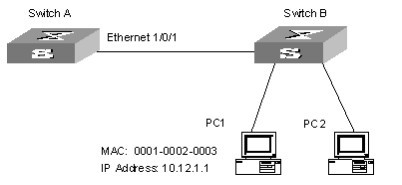
3. 配置步骤
配置Switch A。
# 进入系统视图。
<H3C> system-view
# 进入Ethernet1/0/1端口视图。
[H3C] interface Ethernet1/0/1
# 将PC1的MAC地址和IP地址绑定到Ethernet1/0/1端口。
[H3C-Ethernet1/0/1] am user-bind mac-addr 0001-0002-0003 ip-addr 10.12.1.1
|
操作 |
命令 |
说明 |
|
进入系统视图 |
system-view |
- |
|
将合法用户的MAC地址和IP地址绑定到指定端口上 |
am user-bind mac-addr mac-address ip-addr ip-address interface interface-type interface-number |
可选 |
|
进入以太网端口视图 |
interface interface-type interface-number |
- |
|
将合法用户的MAC地址和IP地址绑定到当前端口上 |
am user-bind mac-addr mac-address ip-addr ip-address |
可选 |
& 说明:
对同一个MAC地址,系统只允许进行一次绑定操作。
