




1. 组网需求
由于网络规模迅速扩大,当前中心交换机(Device A)转发能力已经不能满足需求,现需要在保护
现有投资的基础上将网络转发能力提高一倍,并要求网络易管理、易维护。
2. 组网图
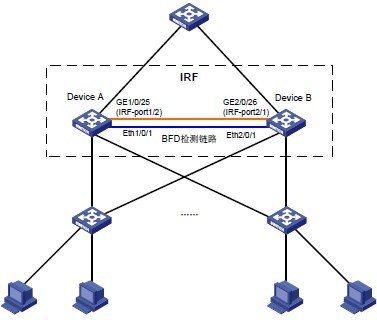
3. 配置思路
Device A 处于局域网的汇聚层,为了将汇聚层的转发能力提高一倍,需要另外增加一台设备Device B。
鉴于第二代智能弹性架构 IRF 技术具有管理简便、网络扩展能力强、可靠性高等优点,所以本例使用IRF 技术构建网络汇聚层(即在Device A 和Device B 上配置IRF 功能),接入层设备通过聚合双链路上行。
为了防止万一 IRF 链路故障导致IRF 分裂、网络中存在两个配置冲突的IRF,需要启用MAD检测功能。因为成员设备比较少,我们采用BFD MAD 检测方式来监测IRF 的状态。
4. 配置步骤
(1) 配置设备编号
# Device A 保留缺省编号为1,不需要进行配置。
# 在Device B 上将设备的成员编号修改为2。
<DeviceB> system-view
[DeviceB] irf member 1 renumber 2
Warning: Renumbering the switch number may result in configuration change or loss. Continue?
[Y/N]:y
[DeviceB]
(2) 将两台设备断电后,按图1-14所示连接IRF链路,然后将两台设备上电。
# 在Device A 上创建设备的IRF 端口2,与物理端口GigabitEthernet1/0/25 绑定,并保存配置。
<DeviceA> system-view
[DeviceA] interface gigabitethernet 1/0/25
[DeviceA-GigabitEthernet1/0/25] shutdown
[DeviceA] irf-port 1/2
[DeviceA-irf-port1/2] port group interface gigabitethernet 1/0/25
[DeviceA-irf-port1/2] quit
[DeviceA] interface gigabitethernet 1/0/25
[DeviceA-GigabitEthernet1/0/25] undo shutdown
[DeviceA-GigabitEthernet1/0/25] save
# 在Device B 上创建设备的IRF 端口1,与物理端口GigabitEthernet2/0/26 绑定,并保存配置。
<DeviceB> system-view
[DeviceB] interface gigabitethernet 2/0/26
[DeviceB-GigabitEthernet2/0/26] shutdown
[DeviceB] irf-port 2/1
[DeviceB-irf-port2/1] port group interface gigabitethernet 2/0/26
[DeviceB-irf-port2/1] quit
[DeviceB] interface gigabitethernet 2/0/26
[DeviceB-GigabitEthernet2/0/26] undo shutdown
[DeviceB-GigabitEthernet2/0/26] save
# 激活DeviceA 的IRF 端口配置。
[DeviceA-GigabitEthernet1/0/25] quit
[DeviceA] irf-port-configuration active
# 激活DeviceB 的IRF 端口配置。
[DeviceB-GigabitEthernet2/0/26] quit
[DeviceB] irf-port-configuration active
(3) 两台设备间将会进行Master 竞选,竞选失败的一方将自动重启,重启完成后,IRF 形成,系统名称统一为DeviceA。
(4) 配置BFD MAD 检测
# 创建VLAN 3,并将Device A 上的端口Ethernet1/0/1 和Device B 上的端口Ethernet2/0/1 加入VLAN 中。
<DeviceA> system-view
[DeviceA] vlan 3
[DeviceA-vlan3] port ethernet 1/0/1 ethernet 2/0/1
[DeviceA-vlan3] quit
# 创建VLAN 接口3,并配置MAD IP 地址。
[DeviceA] interface vlan-interface 3
[DeviceA-Vlan-interface3] mad bfd enable
[DeviceA-Vlan-interface3] mad ip address 192.168.2.1 24 member 1
[DeviceA-Vlan-interface3] mad ip address 192.168.2.2 24 member 2
[DeviceA-Vlan-interface3] quit
# 按图1-14所示连接BFD MAD链路。
# 因为BFD MAD 和生成树功能互斥,所以在Ethernet1/0/1 和Ethernet2/0/1 上关闭生成树协议。
[DeviceA] interface ethernet 1/0/1
[DeviceA-Ethernet1/0/1] undo stp enable
[DeviceA-Ethernet1/0/1] quit
[DeviceA] interface ethernet 2/0/1
[DeviceA-Ethernet2/0/1] undo stp enable
