




组网需求
如图1所示,用户要求:
l SwitchB对接入用户先用HWTACACS服务器进行认证,如果认证没有响应,再使用本地认证。
l 接入的用户进行用户等级提升时,要求先使用HWTACACS对其进行认证,如果HWTACACS认证没有响应,再使用本地认证。
l SwitchB对接入用户先用HWTACACS服务器进行授权,如果授权没有响应,再使用本地授权。
l SwitchB对接入用户采用HWTACACS计费。
l 对用户进行实时计费,计费间隔为3分钟。
l HWTACACS主用服务器为129.7.66.66/24,备用服务器为129.7.66.67/24,服务器的认证、授权和计费端口号均为49。
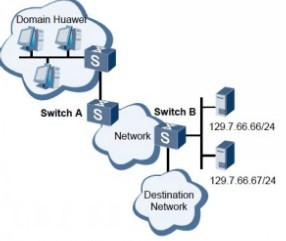
配置思路
采用如下的思路配置对用户使用本地和HWTACACS认证、HWTACACS授权和进行实时计费。
1. 配置HWTACACS服务器模板。
2. 配置认证方案、授权方案、计费方案。
3. 在域下应用HWTACACS服务器模板、认证方案、授权方案、计费方案。
以下配置均在SwitchB上进行。
步骤1 配置HWTACACS服务器模板
# 配置HWTACACS服务器模板ht。
<Quidway> system-view
[Quidway] hwtacacs-server template ht
# 配置HWTACACS主用认证、授权、计费服务器的IP地址和端口。
[Quidway-hwtacacs-ht] hwtacacs-server authentication 129.7.66.66 49
[Quidway-hwtacacs-ht] hwtacacs-server authorization 129.7.66.66 49
[Quidway-hwtacacs-ht] hwtacacs-server accounting 129.7.66.66 49
# 配置HWTACACS备用认证、授权、计费服务器的IP地址和端口。
[Quidway-hwtacacs-ht] hwtacacs-server authentication 129.7.66.67 49 secondary
[Quidway-hwtacacs-ht] hwtacacs-server authorization 129.7.66.67 49 secondary
[Quidway-hwtacacs-ht] hwtacacs-server accounting 129.7.66.67 49 secondary
# 配置TACACS服务器密钥。
[Quidway-hwtacacs-ht] hwtacacs-server shared-key cipher hello
[Quidway-hwtacacs-ht] quit
步骤2 配置认证方案、授权方案、计费方案
# 配置认证方案l-h,认证模式为先进行HWTACACS认证,后进行本地认证。用户级别
提升认证模式为先进行HWTACACS认证,后进行本地认证。
[Quidway] aaa
[Quidway-aaa] authentication-scheme l-h
[Quidway-aaa-authen-l-h] authentication-mode hwtacacs local
[Quidway-aaa-authen-l-h] authentication-super hwtacacs super
[Quidway-aaa-authen-l-h] quit
# 配置授权方案hwtacacs,授权模式为先进行HWTACACS授权,后进行本地授权。
[Quidway-aaa] authorization-scheme hwtacacs
[Quidway-aaa-author-hwtacacs] authorization-mode hwtacacs local
[Quidway-aaa-author-hwtacacs] quit
# 配置计费方案hwtacacs,计费模式为HWTACACS。
[Quidway-aaa] accounting-scheme hwtacacs
[Quidway-aaa-accounting-hwtacacs] accounting-mode hwtacacs
[Quidway-aaa-accounting-hwtacacs] accounting start-fail online
# 配置实时计费间隔为3分钟。
[Quidway-aaa-accounting-hwtacacs] accounting realtime 3
[Quidway-aaa-accounting-hwtacacs] quit
步骤3 配置huawei域,在域下采用l-h认证方案、HWTACACS授权方案、HWTACACS计费方案、ht的HWTACACS模板
[Quidway-aaa] domain huawei
[Quidway-aaa-domain-huawei] authentication-scheme l-h
[Quidway-aaa-domain-huawei] authorization-scheme hwtacacs
[Quidway-aaa-domain-huawei] accounting-scheme hwtacacs
[Quidway-aaa-domain-huawei] hwtacacs-server ht
[Quidway-aaa-domain-huawei] quit
[Quidway-aaa] quit
步骤4 检查配置结果
在SwitchB上执行命令display hwtacacs-server template,可以观察到该HWTACACS服务器模板的配置与要求一致。
<Quidway> display hwtacacs-server template ht
--------------------------------------------------------------------------
HWTACACS-server template name : ht
Primary-authentication-server : 129.7.66.66:49:-
Primary-authorization-server : 129.7.66.66:49:-
Primary-accounting-server : 129.7.66.66:49:-
Secondary-authentication-server : 129.7.66.67:49:-
Secondary-authorization-server : 129.7.66.67:49:-
Secondary-accounting-server : 129.7.66.67:49:-
Current-authentication-server : 129.7.66.66:49:-
Current-authorization-server : 129.7.66.66:49:-
Current-accounting-server : 129.7.66.66:49:-
Source-IP-address : 0.0.0.0
Shared-key : ****************
Quiet-interval(min) : 5
Response-timeout-Interval(sec) : 5
Domain-included : Yes
Traffic-unit : B
--------------------------------------------------------------------------
同时在SwitchB上执行命令display domain,可以观察到该域的配置与要求一致。
<Quidway> display domain name huawei
Domain-name : huawei
Domain-state : Active
Authentication-scheme-name : l-h
Accounting-scheme-name : hwtacacs
Authorization-scheme-name : hwtacacs
Service-scheme-name : -
RADIUS-server-template : shiva
HWTACACS-server-template : ht
----结束
SwitchB的配置文件
#
hwtacacs-server template ht
hwtacacs-server authentication 129.7.66.66
hwtacacs-server authentication 129.7.66.67 secondary
hwtacacs-server authorization 129.7.66.66
hwtacacs-server authorization 129.7.66.67 secondary
hwtacacs-server accounting 129.7.66.66
hwtacacs-server accounting 129.7.66.67 secondary
hwtacacs-server shared-key cipher %$%$|)<+J>dN>=IqD<gO/Fj$xo%$%$
#
aaa
authentication-scheme default
authentication-scheme l-h
authentication-mode hwtacacs local
authentication-super hwtacacs super
authorization-scheme default
authorization-scheme hwtacacs
authorization-mode hwtacacs local
accounting-scheme default
accounting-scheme hwtacacs
accounting-mode hwtacacs
accounting realtime 3
domain default
domain default_admin
domain huawei
authentication-scheme l-h
accounting-scheme hwtacacs
authorization-scheme hwtacacs
hwtacacs-server ht
#
return
