




组网需求
AC或AP一台,本配置举例使用的AC为WX5002无线控制器,AP为WA2100无线局域网接入点。
配置步骤
3.3.1 AC的 BootWare升级方法(以WX5002设备为例)
1. 方法一:
直接升级应用程序文件,可以通过ftp等方式down到flash上,然后指定该文件作为主文件。
<AC>boot-loader file wx5002.bin main
This command will set boot file, Continue? [Y/N]:y
The specified file will be used as the main boot file at the next reboot!
<AC>
BootWare程序同应用程序捆绑升级,即用户不需要单独升级BootWare程序,在升级最新版本的应用程序时,系统将检测当前的BootWare版本和主机应用程序内包含的BootWare版本是否一致,如果检测到不一致,系统就会自动将当前的BootWare刷新。需要注意的是,此方法不能用于BootWare降级。
2. 方法二:
通过手工升级,需要有应用程序文件或单独的BootWare文件。
<AC>bootrom update file wx5002.bin
This command will update bootrom file, Continue? [Y/N]:y
Now updating bootrom, please wait...
Updating basic bootrom!
Update basic bootrom success!
Updating extended bootrom!
Update extended bootrom success!
Update bootrom success!
<H3C>
3. 方法三:通过BootWare菜单升级
*******************************************
* *
* H3C WCM BootWare , Ver 1.07 *
* *
*******************************************
CPLD Version is 1.00
Hardware Version is Ver.C
GE0 ..............................OK!
GE1 ..............................OK!
==================<EXTEND-BOOTWARE MENU>===================
| <1> Boot System |
| <2> Enter Serial SubMenu |
| <3> Enter Ethernet SubMenu |
| <4> File Control |
| <5> Modify BootWare Password |
| <6> Ignore System Configuration |
| <7> BootWare Operation Menu |
| <8> Clear Super Password |
| <0> Reboot |
===========================================================
Enter your choice (0-8):
(1) 选择<7>,进入BootWare操作菜单,如图:
=====================<BOOTWARE OPERATION>====================
| <1> Backup Full BootWare |
| <2> Restore Full BootWare |
| <3> Update Full BootWare With XModem |
| <4> Update Extend BootWare With XModem |
| <5> Update Basic BootWare With XModem |
| <0> Exit To Main Menu |
=============================================================
Enter your choice (0-5):
(2) 在BootWare菜单中选择<3>更新BootWare程序
(3) 键入<5>,选择用115200的速度下载程序
========================<BAUDRATE SET>=======================
|Note: Change The HyperTerminal's Baudrate Accordingly, |
| Press 'Enter' to exit with things untouched. |
|--------------------<Baudrate Avaliable>------------------- |
| <1> 9600(Default) |
| <2> 19200 |
| <3> 38400 |
| <4> 57600 |
| <5> 115200 |
| <0> Exit |
=============================================================
Enter Your Choice (0-5):
(4) 系统会提示修改超级终端的波特率为115200
Download speed is 115200 bps. Change the terminal's speed to 115200 bps,
and select XMODEM protocol. Press 'Enter' key when ready.
(5) 修改超级终端的波特率为115200
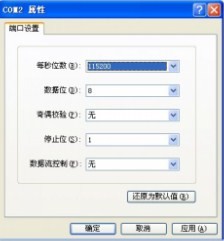
(6) 选择BootWare升级文件46BtmPacketV1.08.bin(或者更高版本),开始升级,协议选择Xmodem
Download speed is 115200 bps. Change the terminal's speed to 115200 bps,
and select XMODEM protocol. Press 'Enter' key when ready.
Now Downloading Program File.
Please Start Transfer Program File And Use Xmodem Protocol.
If You Want To Exit.Press 'Ctrl+X'.
Waiting...CCCCCCCCCCCCCCCCCCCCCCCCC
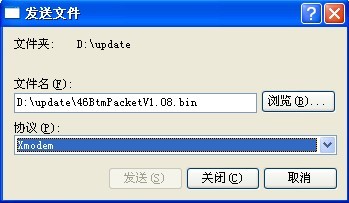
(7) 传送结束后,系统会提示是否升级基本段和扩展段,请全部选择“Y”。
Download speed is 115200 bps. Change the terminal's speed to 115200 bps,
and select XMODEM protocol. Press 'Enter' key when ready.
Now Downloading Program File.
Please Start Transfer Program File And Use Xmodem Protocol.
If You Want To Exit.Press 'Ctrl+X'.
Waiting...CCC
Download successfully!
404608 bytes downloaded!
Updating Basic BootWare? Yes or No (Y/N) :y
Updating Basic BTM
Updating the Norm Basic BootWare....Done
Updating Extend BootWare? Yes or No (Y/N) :y
Updating Extend BTM
Updating Extend BootWare....Done
Please use 9600 bps.Press 'Enter' key to exit to Main Menu.
(8) 更新完成后,根据提示,将波特率设置为9600,然后重新启动设备。
AC的BOOTWare密码恢复
AC的BootWare密码恢复方法(以WX5002设备为例)
如果AC的BootWare口令丢失,请与代理商联系,技术人员会帮助您进入无线控制器,并重新设置口令。
BootWare口令修改是在BootWare主菜单下实现的:
在BootWare主菜单下键入<5>,按提示更改密码。配置终端显示如下:
Change password.
Old password: 输入旧密码
New password: 输入新密码
Verify: 再输入一次新密码确认
........Password Set Successfully. 密码设置成功
一旦旧密码输入错误或者确认新密码错误,则密码修改失败,此时将退出此操作。
