




组网需求
RouterA与RouterB之间创建Eth-Trunk,将两个三层Ethernet接口捆绑成一个Eth-Trunk接口,可以增加带宽和提高可靠性。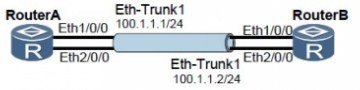
配置思路
采用如下的思路配置Eth-Trunk:
1. 创建三层Eth-Trunk接口并配置IP地址。
2. 把三层Ethernet接口加入Eth-Trunk接口。
操作步骤
步骤1 配置RouterA
<Huawei> system-view
[Huawei] sysname RouterA
# 创建三层Eth-Trunk接口,并配置IP地址。
[RouterA] interface eth-trunk 1
[RouterA-Eth-Trunk1] undo portswitch
[RouterA-Eth-Trunk1] ip address 100.1.1.1 24
[RouterA-Eth-Trunk1] quit
# 将三层接口Ethernet1/0/0、Ethernet2/0/0加入到Eth-Trunk 1中。
[RouterA] interface ethernet 1/0/0
[RouterA-Ethernet1/0/0] eth-trunk 1
[RouterA-Ethernet1/0/0] quit
[RouterA] interface ethernet 2/0/0
[RouterA-Ethernet2/0/0] eth-trunk 1
[RouterA-Ethernet2/0/0] quit
步骤2 配置RouterB
<Huawei> system-view
[Huawei] sysname RouterB
# 创建三层Eth-Trunk接口,并配置IP地址。
[RouterB] interface eth-trunk 1
[RouterB-Eth-Trunk1] undo portswitch
[RouterB-Eth-Trunk1] ip address 100.1.1.2 24
[RouterB-Eth-Trunk1] quit
# 将三层接口Ethernet1/0/0、Ethernet2/0/0加入到Eth-Trunk 1中。
[RouterB] interface ethernet 1/0/0
[RouterB-Ethernet1/0/0] eth-trunk 1
[RouterB-Ethernet1/0/0] quit
[RouterB] interface ethernet 2/0/0
[RouterB-Ethernet2/0/0] eth-trunk 1
[RouterB-Ethernet2/0/0] quit
步骤3 检查配置结果
在RouterA或RouterB上执行display interface eth-trunk命令,可以看到接口状态为UP。
以RouterA的显示为例。
[RouterA] display interface eth-trunk 1
Eth-Trunk1 current state : UP
Line protocol current state : UP
Description:HUAWEI, AR Series, Eth-Trunk1 Interface
Route Port,Hash arithmetic : According to SIP-XOR-DIP,The Maximum Transmit Unit
is 1500
Internet Address is 100.1.1.1/24
IP Sending Frames' Format is PKTFMT_ETHNT_2, Hardware address is 00e0-fc09-9722
Current system time: 2011-4-14 14:51:01
Input bandwidth utilization : 0.00%
Output bandwidth utilization : 0.00%
-----------------------------------------------------
PortName Status Weight
-----------------------------------------------------
Ethernet1/0/0 UP 1
Ethernet2/0/0 UP 1
-----------------------------------------------------
The Number of Ports in Trunk : 2
The Number of UP Ports in Trunk : 2
RouterA和RouterB的Eth-Trunk接口能够互相Ping通。
[RouterA] ping -a 100.1.1.1 100.1.1.2
PING 100.1.1.2: 56 data bytes, press CTRL_C to break
Reply from 100.1.1.2: bytes=56 Sequence=1 ttl=255 time=31 ms
Reply from 100.1.1.2: bytes=56 Sequence=2 ttl=255 time=31 ms
Reply from 100.1.1.2: bytes=56 Sequence=3 ttl=255 time=62 ms
Reply from 100.1.1.2: bytes=56 Sequence=4 ttl=255 time=62 ms
Reply from 100.1.1.2: bytes=56 Sequence=5 ttl=255 time=62 ms
--- 100.1.1.2 ping statistics ---
5 packet(s) transmitted
5 packet(s) received
0.00% packet loss
round-trip min/avg/max = 31/49/62 ms
华为AR系列路由器手工负载分担模式链路聚合示例:
http://www.elvhome.com/html/2013-5-22/20135221729669805.html
华为AR系列路由器配置LACP 模式链路聚合示例:
http://www.elvhome.com/html/2013-5-22/201352217352621426.html
