




组网需求
如图1所示,公司A、公司A的分公司以及公司B之间有较多的交换设备相连,需要通过GVRP功能,实现VLAN的动态注册。公司A的分公司与总部通过SwitchA和SwitchB互通;公司B通过SwitchB和SwitchC与公司A互通,但只允许公司B配置的VLAN通过。
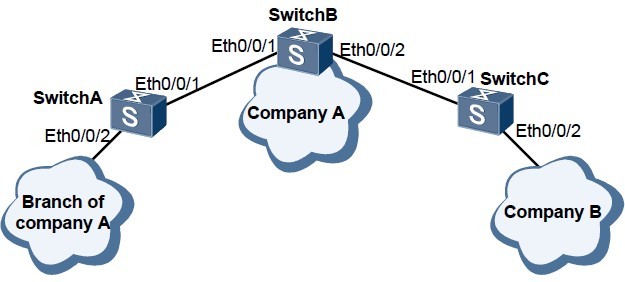
配置思路
采用如下的思路配置GVRP:
1. 使能GVRP功能,实现VLAN的动态注册。
2. 公司A的所有交换机配置GVRP功能并配置接口注册模式为Normal,以简化配置。
3. 公司B的所有交换机配置GVRP功能并将与公司A相连的接口的注册模式配置为Fixed,以控制只允许公司B配置的VLAN通过。
操作步骤
步骤1 配置交换机SwitchA
# 全局使能GVRP功能。
<Quidway> system-view
[Quidway] sysname SwitchA
[SwitchA] gvrp
# 配置接口为Trunk类型,并允许所有VLAN通过。
[SwitchA] interface ethernet 0/0/1
[SwitchA-Ethernet0/0/1] port link-type trunk
[SwitchA-Ethernet0/0/1] port trunk allow-pass vlan all
[SwitchA-Ethernet0/0/1] quit
[SwitchA] interface ethernet 0/0/2
[SwitchA-Ethernet0/0/2] port link-type trunk
[SwitchA-Ethernet0/0/2] port trunk allow-pass vlan all
[SwitchA-Ethernet0/0/2] quit
# 使能接口的GVRP功能,并配置接口注册模式。
[SwitchA] interface ethernet 0/0/1
[SwitchA-Ethernet0/0/1] gvrp
[SwitchA-Ethernet0/0/1] gvrp registration normal
[SwitchA-Ethernet0/0/1] quit
[SwitchA] interface ethernet 0/0/2
[SwitchA-Ethernet0/0/2] gvrp
[SwitchA-Ethernet0/0/2] gvrp registration normal
[SwitchA-Ethernet0/0/2] quit
SwitchB配置与SwitchA配置类似,这里不再赘述。
步骤2 配置交换机SwitchC
# 创建VLAN101~VLAN200。
<Quidway> system-view
[Quidway] sysname SwitchC
[SwitchC] vlan batch 101 to 200
# 全局使能GVRP功能。
[SwitchC] gvrp
# 配置接口为Trunk类型,并允许所有VLAN通过。
[SwitchC] interface ethernet 0/0/1
[SwitchC-Ethernet0/0/1] port link-type trunk
[SwitchC-Ethernet0/0/1] port trunk allow-pass vlan all
[SwitchC-Ethernet0/0/1] quit
[SwitchC] interface ethernet 0/0/2
[SwitchC-Ethernet0/0/2] port link-type trunk
[SwitchC-Ethernet0/0/2] port trunk allow-pass vlan all
[SwitchC-Ethernet0/0/2] quit
# 使能接口的GVRP功能,并配置接口注册模式。
[SwitchC] interface ethernet 0/0/1
[SwitchC-Ethernet0/0/1] gvrp
[SwitchC-Ethernet0/0/1] gvrp registration fixed
[SwitchC-Ethernet0/0/1] quit
[SwitchC] interface ethernet 0/0/2
[SwitchC-Ethernet0/0/2] gvrp
[SwitchC-Ethernet0/0/2] gvrp registration normal
[SwitchC-Ethernet0/0/2] quit
步骤3 验证配置结果
配置完成后,公司A的分公司用户可以与总部互通,公司A属于VLAN101~VLAN200的用户可以与公司B用户互通。
在SwitchA上使用命令display gvrp status,查看全局GVRP的使能情况,结果如下:
<SwitchA> display gvrp status
GVRP is enabled
在SwitchA上使用命令display gvrp statistics,查看接口的GVRP统计信息,其中包括:
GVRP状态、GVRP注册失败次数、上一个GVRP数据单元源MAC地址和接口GVRP注册类型,结果如下:
<SwitchA> display gvrp statistics
GVRP statistics on port Ethernet0/0/1
GVRP status : Enabled
GVRP registrations failed : 0
GVRP last PDU origin : 0000-0000-0000
GVRP registration type : Normal
GVRP statistics on port Ethernet0/0/2
GVRP status : Enabled
GVRP registrations failed : 0
GVRP last PDU origin : 0000-0000-0000
GVRP registration type : Normal
SwitchB和SwitchC的查看方法与SwitchA类似,这里不再赘述。
