




组网需求
该组网的特点是远端设备Server已经部署管理VLAN,本端设备SwitchA下挂的用户所属VLAN ID与管理VLAN ID一样。而运营商提供的VLAN ID与管理VLAN ID(用户所属的VLAN ID)不相同。当用户需要从SwitchA上远程登录到Server上进行远端管理VLAN业务时,可通过本示例实现。如图5-7所示,SwitchA与远端设备Server通过第三方网络互连。Server已经部署管理VLAN,SwitchA下挂的用户所属VLAN ID与管理VLAN ID一样。而运营商提供的VLAN ID与管理VLAN ID(用户所属的VLAN ID)不相同。
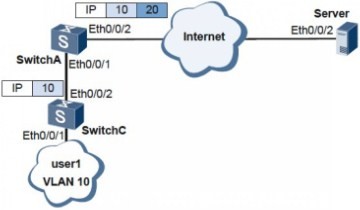
当用户需要从SwitchA远程登录到远端设备Server上进行远端管理业务时,可在远端设备Server上通过在管理VLAN对应的VLANIF接口上部署QinQ Stacking功能实现远程管理。
说明
在VLANIF接口上配置QinQ Stacking功能时,VLANIF接口对应的VLAN必须是管理VLAN。其他类型的VLAN,创建VLANIF接口后均不支持配置QinQ Stacking功能。
配置思路
采用如下的思路配置VLANIF接口支持QinQ Stacking:
1. 在SwitchA上配置QinQ功能。
2. 在Server上进行如下配置:
a. 创建VLAN10,并配置为管理VLAN。
b. 在对应的管理VLAN下,配置VLANIF接口。
c. 在VLANIF接口下,配置QinQ Stacking功能。
操作步骤
步骤1 配置SwitchC
# 允许接口Eth0/0/1和Eth0/0/2通过VLAN10报文。
<Quidway> system-view
[Quidway] sysname SwitchC
[SwitchC] vlan batch 10
[SwitchC] interface ethernet 0/0/1
[SwitchC-Ethernet0/0/1] port hybrid tagged vlan 10
[SwitchC-Ethernet0/0/1] quit
[SwitchC] interface ethernet 0/0/2
[SwitchC-Ethernet0/0/2] port hybrid tagged vlan 10
[SwitchC-Ethernet0/0/2] quit
步骤2 配置SwitchA
# 配置QinQ功能,使SwitchA发送到Server的报文带有两层Tag。
<Quidway> system-view
[Quidway] sysname SwitchA
[SwitchA] vlan batch 20
[SwitchA] interface ethernet 0/0/1
[SwitchA-Ethernet0/0/1] qinq vlan-translation enable
[SwitchA-Ethernet0/0/1] port vlan-stacking vlan 10 stack-vlan 20
[SwitchA-Ethernet0/0/1] port hybrid untagged vlan 20
[SwitchA-Ethernet0/0/1] quit
[SwitchA] interface ethernet 0/0/2
[SwitchA-Ethernet0/0/2] port hybrid tagged vlan 20
[SwitchA-Ethernet0/0/2] quit
步骤3 配置Server
# 允许接口Eth0/0/2通过VLAN20报文。
<Quidway> system-view
[Quidway] sysname Server
[Server] vlan batch 10 20
[Server] interface ethernet 0/0/2
[Server-Ethernet0/0/2] port hybrid tagged vlan 20
[Server-Ethernet0/0/2] quit
# 配置QinQ Stacking功能。
[Server] vlan 10
[Server-vlan10] management-vlan
[Server-vlan10] quit
[Server] interface vlanif 10
[Server-Vlanif10] undo icmp host-unreachable send
[Server-Vlanif10] qinq stacking vlan 20
[Server-Vlanif10] ip address 10.10.10.1 24
[Server-Vlanif10] quit
[Server] interface ethernet 0/0/2
[Server-Ethernet0/0/2] port hybrid tagged vlan 10 20
步骤4 检查配置结果
从SwitchA可以远程登录到Server上,实现远程管理VLAN业务。
----结束
