




组网需求
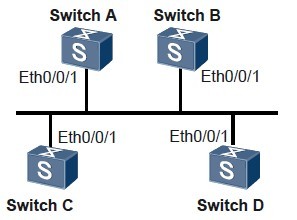
在图中,SwitchA的优先级为100,它是网络上的最高优先级,所以SwitchA被选为DR;SwitchC是优先级第二高的,被选为BDR;SwitchB的优先级为0,这意味着它将无法成为DR或BDR;SwitchD没有配置优先级,取缺省值1。
图1 配置OSPF 的DR 选择组网图
设备 接口 对应的VLANIF IP地址
SwitchA Ethernet 0/0/1 VLANIF 10 192.168.1.1/24
SwitchB Ethernet 0/0/1 VLANIF 10 192.168.1.2/24
SwitchC Ethernet 0/0/1 VLANIF 10 192.168.1.3/24
SwitchD Ethernet 0/0/1 VLANIF 10 192.168.1.4/24
配置思路
采用如下的思路配置OSPF的DR选择:
1. 配置各接口所属VLAN ID。
2. 配置各VLANIF接口的IP地址。
3. 配置各台Switch上Router ID,使能OSPF,指定网段。
4. 在缺省优先级情况下,查看各台Switch的DR/BDR状态。
5. 配置接口上的DR优先级,查看DR/BDR状态。
配置步骤
1. 配置各接口所属的VLAN(略)
2. 配置各接口的IP地址(略)
3. 配置OSPF基本功能
# 配置SwitchA。
[SwitchA] router id 1.1.1.1
[SwitchA] ospf
[SwitchA-ospf-1] area 0
[SwitchA-ospf-1-area-0.0.0.0] network 192.168.1.0 0.0.0.255
[SwitchA-ospf-1-area-0.0.0.0] quit
[SwitchA-ospf-1] quit
# 配置SwitchB。
[SwitchB] router id 2.2.2.2
[SwitchB] ospf
[SwitchB-ospf-1] area 0
[SwitchB-ospf-1-area-0.0.0.0] network 192.168.1.0 0.0.0.255
[SwitchB-ospf-1-area-0.0.0.0] quit
[SwitchB-ospf-1] quit
# 配置SwitchC。
[SwitchC] router id 3.3.3.3
[SwitchC] ospf
[SwitchC-ospf-1] area 0
[SwitchC-ospf-1-area-0.0.0.0] network 192.168.1.0 0.0.0.255
[SwitchC-ospf-1-area-0.0.0.0] quit
[SwitchC-ospf-1] quit
# 配置SwitchD。
[SwitchD] router id 4.4.4.4
[SwitchD] ospf
[SwitchD-ospf-1] area 0
[SwitchD-ospf-1-area-0.0.0.0] network 192.168.1.0 0.0.0.255
[SwitchD-ospf-1-area-0.0.0.0] quit
[SwitchD-ospf-1] quit
# 查看DR/BDR的状态。
[SwitchA] display ospf peer
OSPF Process 1 with Router ID 1.1.1.1
Neighbors
Area 0.0.0.0 interface 192.168.1.1(Vlanif10)'s neighbors
Router ID: 2.2.2.2 Address: 192.168.1.2
State: 2-Way Mode:Nbr is Master Priority: 1
DR: 192.168.1.4 BDR: 192.168.1.3 MTU: 0
Dead timer due in 32 sec
Retrans timer interval: 5
Neighbor is up for 00:00:00
Authentication Sequence: [ 0 ]
Router ID: 3.3.3.3 Address: 192.168.1.3
State: Full Mode:Nbr is Master Priority: 1
DR: 192.168.1.4 BDR: 192.168.1.3 MTU: 0
Dead timer due in 37 sec
Retrans timer interval: 5
Neighbor is up for 00:04:06
Authentication Sequence: [ 0 ]
Router ID: 4.4.4.4 Address: 192.168.1.4
State: Full Mode:Nbr is Master Priority: 1
DR: 192.168.1.4 BDR: 192.168.1.3 MTU: 0
Dead timer due in 37 sec
Retrans timer interval: 5
Neighbor is up for 00:03:53
Authentication Sequence: [ 0 ]
查看SwitchA的邻居信息,可以看到DR优先级(缺省为1)以及邻居状态,此时SwitchD为DR,SwitchC为BDR。
说明
当优先级相同时,Router ID高的为DR。如果Switch某个Ethernet接口成为DR之后,则这台Switch的其他广播接口在进行后续的DR选择时,具有高优先权。即选择已经是DR的Switch为DR,DR不可抢占。
4. 配置接口上的DR优先级
# 配置SwitchA。
[SwitchA] interface vlanif 10
[SwitchA-Vlanif10] ospf dr-priority 100
[SwitchA-Vlanif10] quit
# 配置SwitchB。
[SwitchB] interface vlanif 10
[SwitchB-Vlanif10] ospf dr-priority 0
[SwitchB-Vlanif10] quit
# 配置SwitchC。
[SwitchC] interface vlanif 10
[SwitchC-Vlanif10] ospf dr-priority 2
[SwitchC-Vlanif10] quit
# 查看DR/BDR的状态。
[SwitchD] display ospf peer
OSPF Process 1 with Router ID 4.4.4.4
Neighbors
Area 0.0.0.0 interface 192.168.1.4(Vlanif10)'s neighbors
Router ID: 1.1.1.1 Address: 192.168.1.1
State: Full Mode:Nbr is Slave Priority: 100
DR: 192.168.1.4 BDR: 192.168.1.3 MTU: 0
Dead timer due in 31 sec
Retrans timer interval: 5
Neighbor is up for 00:11:17
Authentication Sequence: [ 0 ]
Router ID: 2.2.2.2 Address: 192.168.1.2
State: Full Mode:Nbr is Slave Priority: 0
DR: 192.168.1.4 BDR: 192.168.1.3 MTU: 0
Dead timer due in 35 sec
Retrans timer interval: 5
Neighbor is up for 00:11:19
Authentication Sequence: [ 0 ]
Router ID: 3.3.3.3 Address: 192.168.1.3
State: Full Mode:Nbr is Slave Priority: 2
DR: 192.168.1.4 BDR: 192.168.1.3 MTU: 0
Dead timer due in 33 sec
Retrans timer interval: 5
Neighbor is up for 00:11:15
Authentication Sequence: [ 0 ]
说明
接口上的DR优先级在配置之后并不会立即生效。
5. 重启OSPF进程
在各Switch的用户视图下,同时执行命令reset ospf 1 process,以重启OSPF进程。
6. 验证配置结果
# 查看OSPF邻居状态。
[SwitchD] display ospf peer
OSPF Process 1 with Router ID 4.4.4.4
Neighbors
Area 0.0.0.0 interface 192.168.1.4(Vlanif10)'s neighbors
Router ID: 1.1.1.1 Address: 192.168.1.1
State: Full Mode:Nbr is Master Priority: 100
DR: 192.168.1.1 BDR: 192.168.1.3 MTU: 0
Dead timer due in 35 sec
Retrans timer interval: 5
Neighbor is up for 00:07:19
Authentication Sequence: [ 0 ]
Router ID: 2.2.2.2 Address: 192.168.1.2
State: 2-Way Mode:Nbr is Slave Priority: 0
DR: 192.168.1.1 BDR: 192.168.1.3 MTU: 0
Dead timer due in 35 sec
Retrans timer interval: 5
Neighbor is up for 00:00:00
Authentication Sequence: [ 0 ]
Router ID: 3.3.3.3 Address: 192.168.1.3
State: Full Mode:Nbr is Slave Priority: 2
DR: 192.168.1.1 BDR: 192.168.1.3 MTU: 0
Dead timer due in 37 sec
Retrans timer interval: 5
Neighbor is up for 00:07:17
Authentication Sequence: [ 0 ]
# 查看OSPF接口的状态。
[SwitchA] display ospf interface
OSPF Process 1 with Router ID 1.1.1.1
Interfaces
Area: 0.0.0.0
IP Address Type State Cost Pri DR BDR
192.168.1.1 Broadcast DR 1 100 192.168.1.1 192.168.1.3
[SwitchB] display ospf interface
OSPF Process 1 with Router ID 2.2.2.2
Interfaces
Area: 0.0.0.0
IP Address Type State Cost Pri DR BDR
192.168.1.2 Broadcast DROther 1 0 192.168.1.1 192.168.1.3
如果邻居的状态是Full,这说明它和邻居之间形成了邻接关系;如果停留在2-Way的状态,则说明他们都不是DR或BDR,两者之间不需要交换LSA。如果OSPF接口的状态是DROther,则说明它既不是DR,也不是BDR。
配置文件下载地址:
http://pan.baidu.com/share/link?shareid=401210&uk=2332071257
不能下载请联系我,QQ:378254296 ,留下你的邮箱,我会发给你。指明文件。
