




组网需求
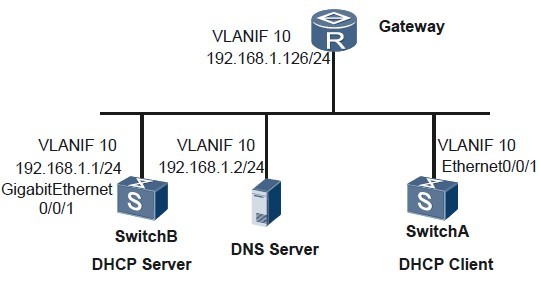
如图1 所示,SwitchA 作为DHCP 客户端,从作为DHCP 服务器的SwitchB 中获取动态绑定的IP 地址、DNS 服务器、网关地址等信息。
图1 配置DHCP 客户端组网图
配置思路
DHCP 客户端示例的配置思路如下:
1. 在SwitchA 上使能DHCP 客户端功能。
2. 在SwitchB 上创建DHCP 服务器的全局地址池并配置相关属性。
数据准备
完成此配置举例,需要准备以下数据:
1. SwitchB VLANIF 接口的IP 地址:192.168.1.1。
2. DHCP 客户端的出口网关地址:192.168.1.126。
3. DHCP 客户端的DNS 服务器地址:192.168.1.2。
操作步骤
SwitchA 上配置DHCP 客户端功能。
# 使能DHCP 服务。
<Quidway> system-view
[Quidway] sysname SwitchA
[SwitchA] dhcp enable
# 创建VLAN 并将Ethernet0/0/1 接口加入到VLAN 中。
[SwitchA] vlan 10
[SwitchA-Vlan10] quit
[SwitchA] interface ethernet 0/0/1
[SwitchA-Ethernet0/0/1] port link-type trunk
[SwitchA-Ethernet0/0/1] port trunk allow-pass vlan 10
[SwitchA-Ethernet0/0/1] quit
# 在VLANIF 接口上使能DHCP 客户端功能。
[SwitchA] vlan 10
[SwitchA-vlan10] quit
[SwitchA] interface vlanif 10
[SwitchA-Vlanif10] ip address dhcp-alloc
在SwitchB 上创建DHCP 服务器的全局地址池并配置相关属性。
1. 使能DHCP 服务。
<Quidway> system-view
[Quidway] sysname SwitchB
[SwitchB] dhcp enable
2. 创建VLAN 并将GigabitEthernet0/0/1 接口加入到VLAN 中。
[SwitchB] vlan 10
[SwitchB-Vlan100] quit
[SwitchB] interface gigabitethernet 0/0/1
[SwitchB-GigabitEthernet0/0/1] port link-type trunk
[SwitchB-GigabitEthernet0/0/1] port trunk allow-pass vlan 10
[SwitchB-GigabitEthernet0/0/1] quit
3. 配置VLANIF 接口工作在全局地址池模式。
[SwitchB] interface vlanif 10
[SwitchB-Vlanif10] ip address 192.168.1.1 24
[SwitchB-Vlanif10] dhcp select global
[SwitchB-Vlanif10] quit
4. 创建地址池并配置相关属性。
[SwitchB] ip pool pool1
[SwitchB-ip-pool-pool1] network 192.168.1.0 mask 24
[SwitchB-ip-pool-pool1] gateway-list 192.168.1.126
[SwitchB-ip-pool-pool1] dns-list 192.168.1.2
[SwitchB-ip-pool-pool1] quit
验证配置结果。
# 在SwitchA 上执行display current-configuration 命令,查看DHCP 客户端功能的配置情况。
[SwitchA] display current-configuration
...
#
interface vlanif 10
ip address dhcp-alloc
#
...
DHCP Client 接口的客户端状态信息。
[SwitchA] display dhcp client
DHCP client lease information on interface Vlanif10 :
Current machine state : Bound
Internet address assigned via : DHCP
Physical address : 0018-8201-0987
IP address : 192.168.1.254
Subnet mask : 255.255.255.0
Gateway ip address : 192.168.1.126
DHCP server : 192.168.1.2
Lease obtained at : 2008-11-06 02:48:09
Lease expires at : 2008-11-06 03:48:09
Lease renews at : 2008-11-06 03:18:09
Lease rebinds at : 2008-11-06 03:40:39
DNS : 192.168.1.2
# 在SwitchB 上执行display ip pool 命令,查看IP 地址池配置情况。
[SwitchB] display ip pool
-----------------------------------------------------------------------
Pool-name : pool1
Pool-No : 0
Position : Local Status : Unlocked
Gateway-0 : 192.168.1.126
Mask : 255.255.255.0
VPN instance : --
IP address Statistic
Total :253
Used :1 Idle :252
Expired :0 Conflict :0 Disable :0
----结束
配置文件下载:
http://pan.baidu.com/share/link?shareid=401384&uk=2332071257
不能下载联系我,Q:378254296 ,留下邮箱我会发给你!
