




组网需求
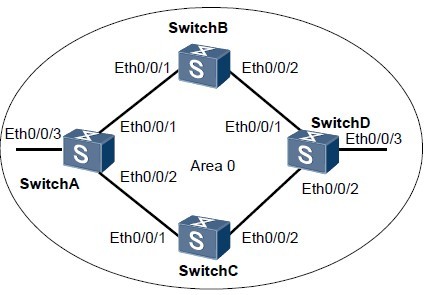
如图1所示:
l SwitchA、SwitchB、SwitchC和SwitchD之间通过OSPF协议达到IP网络互连的目的。
l SwitchA、SwitchB、SwitchC和SwitchD同属于区域0。
l 要求配置负载分担,使得SwitchA的流量,可以分别通过SwitchB和SwitchC发送到SwitchD。
图1 配置OSPF 负载分担组网图
设备 接口 对应的VLANIF IP地址
SwitchA Ethernet 0/0/1 VLANIF 10 10.1.1.1/24
SwitchA Ethernet 0/0/2 VLANIF 20 10.1.2.1/24
SwitchA Ethernet 0/0/3 VLANIF 50 172.16.1.1/24
SwitchB Ethernet 0/0/1 VLANIF 10 10.1.1.2/24
SwitchB Ethernet 0/0/2 VLANIF 30 192.168.0.1/24
SwitchC Ethernet 0/0/1 VLANIF 20 10.1.2.2/24
SwitchC Ethernet 0/0/2 VLANIF 40 192.168.1.1/24
SwitchD Ethernet 0/0/1 VLANIF 30 192.168.0.2/24
SwitchD Ethernet 0/0/2 VLANIF 40 192.168.1.2/24
SwitchD Ethernet 0/0/3 VLANIF 60 172.17.1.1/24
配置思路
采用如下的思路配置OSPF的负载分担:
1. 在各台交换机使能OSPF基本功能,实现互连。
2. 取消负载分担,查看路由表信息。
3. 在SwitchA上配置等价路由优先级(可选配置)。
配置步骤
1. 配置各接口所属的VLAN(略)
2. 配置各VLANIF接口的IP地址(略)
3. 配置OSPF的基本功能(请参见举例)请参见举例http://www.elvhome.com/html/2013-5-14/20135141414555462.html
4. 在SwitchA上取消负载分担配置
[SwitchA] ospf
[SwitchA-ospf-1] maximum load-balancing 1
[SwitchA-ospf-1] quit
# 查看SwitchA的路由表。
[SwitchA] display ip routing-table
Route Flags: R - relay, D - download to fib
------------------------------------------------------------------------------
Routing Tables: Public
Destinations : 11 Routes : 11
Destination/Mask Proto Pre Cost Flags NextHop Interface
10.1.1.0/24 Direct 0 0 D 10.1.1.1 Vlanif10
10.1.1.1/32 Direct 0 0 D 127.0.0.1 InLoopBack0
10.1.2.0/24 Direct 0 0 D 10.1.2.1 Vlanif20
10.1.2.1/32 Direct 0 0 D 127.0.0.1 InLoopBack0
127.0.0.0/8 Direct 0 0 D 127.0.0.1 InLoopBack0
127.0.0.1/32 Direct 0 0 D 127.0.0.1 InLoopBack0
172.16.1.0/24 Direct 0 0 D 172.16.1.1 Vlanif50
172.16.1.1/32 Direct 0 0 D 127.0.0.1 InLoopBack0
172.17.1.0/24 OSPF 10 3 D 10.1.1.2 Vlanif10
192.168.0.0/24 OSPF 10 2 D 10.1.1.2 Vlanif10
192.168.1.0/24 OSPF 10 2 D 10.1.2.2 Vlanif20
从路由表中可以看出,当配置负载分担最大等价路由条数为1后,到达目标网段172.17.1.0的下一跳为10.1.1.2。
说明
由于OSPF对等价路由下一跳的选择是随机的,所以上面例子中10.1.1.2被选为最优下一跳。
5. 在SwitchA上恢复负载分担路由的缺省数量
[SwitchA] ospf
[SwitchA-ospf-1] undo maximum load-balancing
[SwitchA-ospf-1] quit
# 查看SwitchA的路由表。
[SwitchA] display ip routing-table
Route Flags: R - relay, D - download to fib
----------------------------------------------------------------------------
Routing Tables: Public
Destinations : 11 Routes : 12
Destination/Mask Proto Pre Cost Flags NextHop Interface
10.1.1.0/24 Direct 0 0 D 10.1.1.1 Vlanif10
10.1.1.1/32 Direct 0 0 D 127.0.0.1 InLoopBack0
10.1.2.0/24 Direct 0 0 D 10.1.2.1 Vlanif20
10.1.2.1/32 Direct 0 0 D 127.0.0.1 InLoopBack0
127.0.0.0/8 Direct 0 0 D 127.0.0.1 InLoopBack0
127.0.0.1/32 Direct 0 0 D 127.0.0.1 InLoopBack0
172.16.1.0/24 Direct 0 0 D 172.16.1.1 Vlanif50
172.16.1.1/32 Direct 0 0 D 127.0.0.1 InLoopBack0
172.17.1.0/24 OSPF 10 3 D 10.1.1.2 Vlanif10
OSPF 10 3 D 10.1.2.2 Vlanif20
192.168.0.0/24 OSPF 10 2 D 10.1.1.2 Vlanif10
192.168.1.0/24 OSPF 10 2 D 10.1.2.2 Vlanif20
从路由表可以看出,当取消负载分担条数设置即恢复缺省配置后,由于最大等价路由条数的缺省值为4,因此SwitchA的两个下一跳10.1.1.2(SwitchB)和10.1.2.2(SwitchC)均成为有效路由。
6. 在SwitchA上配置等价路由优先级(可选配置)
如果不希望SwitchB和SwitchC形成负载分担,可以配置等价路由优先级,指定下一
跳。
[SwitchA] ospf
[SwitchA-ospf-1] nexthop 10.1.2.2 weight 1
[SwitchA-ospf-1] quit
# 查看SwitchA的路由表
[SwitchA] display ip routing-table
Route Flags: R - relay, D - download to fib
------------------------------------------------------------------------------
Routing Tables: Public
Destinations : 11 Routes : 11
Destination/Mask Proto Pre Cost Flags NextHop Interface
10.1.1.0/24 Direct 0 0 D 10.1.1.1 Vlanif10
10.1.1.1/32 Direct 0 0 D 127.0.0.1 InLoopBack0
10.1.2.0/24 Direct 0 0 D 10.1.2.1 Vlanif20
10.1.2.1/32 Direct 0 0 D 127.0.0.1 InLoopBack0
127.0.0.0/8 Direct 0 0 D 127.0.0.1 InLoopBack0
127.0.0.1/32 Direct 0 0 D 127.0.0.1 InLoopBack0
172.16.1.0/24 Direct 0 0 D 172.16.1.1 Vlanif50
172.16.1.1/32 Direct 0 0 D 127.0.0.1 InLoopBack0
172.17.1.0/24 OSPF 10 3 D 10.1.2.2 Vlanif20
192.168.0.0/24 OSPF 10 2 D 10.1.1.2 Vlanif10
192.168.1.0/24 OSPF 10 2 D 10.1.2.2 Vlanif20
从路由表中可以看出,当配置等价路由的优先级后,由于下一跳为10.1.2.2(SwitchC)的优先级(权值为1)高于下一跳为10.1.1.2(SwitchB)的优先级,所以OSPF优先选择下一跳为10.1.2.2为唯一最优路由。
配置文件下载地址:
http://pan.baidu.com/share/link?shareid=401234&uk=2332071257
不能下载告诉我,Q:378254296 ,留下你 的邮箱我会发给你。
