




组网需求
如图6-7所示,所有的Switch都运行OSPF,整个自治系统划分为3个区域。其中SwitchA和SwitchB作为ABR来转发区域之间的路由,SwitchD作为ASBR引入了外部路由(静态路由)。要求将Area1配置为Stub区域,减少通告到此区域内的LSA数量,但不影响路由的可达性。
图6-7 配置OSPF Stub 区域组网图
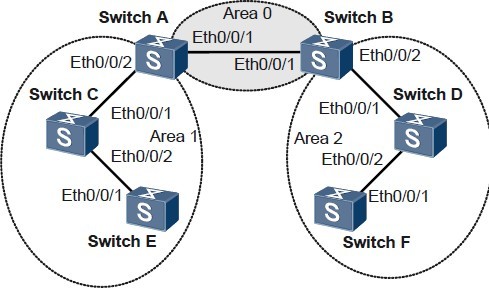
设备 接口 对应的VLANIF IP地址
SwitchA Ethernet 0/0/1 VLANIF 10 192.168.0.1/24
SwitchA Ethernet 0/0/2 VLANIF 20 192.168.1.1/24
SwitchB Ethernet 0/0/1 VLANIF 10 192.168.0.2/24
SwitchB Ethernet 0/0/2 VLANIF 30 192.168.2.1/24
SwitchC Ethernet 0/0/1 VLANIF 20 192.168.1.2/24
SwitchC Ethernet 0/0/2 VLANIF 40 172.16.1.1/24
SwitchD Ethernet 0/0/1 VLANIF 30 192.168.2.2/24
SwitchD Ethernet 0/0/2 VLANIF 50 172.17.1.1/24
SwitchE Ethernet 0/0/1 VLANIF 40 172.16.1.2/24
SwitchF Ethernet 0/0/1 VLANIF 50 172.17.1.2/24
配置思路
采用如下的思路配置OSPF的Stub区域:
1. 在各Switch上使能OSPF,配置OSPF基本功能。
2. 在SwitchD上配置静态路由,并在OSPF中引入。
3. 配置Area1为Stub区域(需要在Area1内所有的Switch上配置Stub命令)。
4. 在SwitchA上配置禁止向Stub区域通告Type3 LSA。
配置步骤
1. 配置OSPF基本功能(请参见举例 http://www.elvhome.com/html/2013-5-14/20135141414555462.html 配置OSPF基本功能)
2. 配置SwitchD引入静态路由
# 在SwitchD引入静态路由,例如。
[SwitchD] ip route-static 200.0.0.0 8 null 0
[SwitchD] ospf
[SwitchD-ospf-1] import-route static type 1
[SwitchD-ospf-1] quit
# 查看SwitchC的ABR/ASBR信息。
[SwitchC] display ospf abr-asbr
OSPF Process 1 with Router ID 3.3.3.3
Routing Table to ABR and ASBR
Type Destination Area Cost Nexthop RtType
Intra-area 1.1.1.1 0.0.0.1 1 192.168.1.1 ABR
Inter-area 4.4.4.4 0.0.0.1 3 192.168.1.1 ASBR
# 查看SwitchC的OSPF路由表。
[SwitchC] display ospf abr-asbr
OSPF Process 1 with Router ID 3.3.3.3
Routing Table to ABR and ASBR
Type Destination Area Cost Nexthop RtType
Intra-area 1.1.1.1 0.0.0.1 1 192.168.1.1 ABR
Inter-area 4.4.4.4 0.0.0.1 3 192.168.1.1 ASBR
# 查看SwitchC的OSPF路由表。
[SwitchC] display ospf routing
OSPF Process 1 with Router ID 3.3.3.3
Routing Tables
Routing for Network
Destination Cost Type NextHop AdvRouter Area
172.16.1.0/24 1 Transit 172.16.1.1 3.3.3.3 0.0.0.1
172.17.1.0/24 4 Inter-area 192.168.1.1 1.1.1.1 0.0.0.1
192.168.0.0/24 2 Inter-area 192.168.1.1 1.1.1.1 0.0.0.1
192.168.1.0/24 1 Transit 192.168.1.2 3.3.3.3 0.0.0.1
192.168.2.0/24 3 Inter-area 192.168.1.1 1.1.1.1 0.0.0.1
Routing for ASEs
Destination Cost Type Tag NextHop AdvRouter
200.0.0.0/8 4 Type1 1 192.168.1.1 4.4.4.4
Total Nets: 6
Intra Area: 2 Inter Area: 3 ASE: 1 NSSA: 0
当SwitchC所在区域为普通区域时,可以看到路由表中存在AS外部的路由。
3. 配置Area1为Stub区域
# 配置SwitchA。
[SwitchA] ospf
[SwitchA-ospf-1] area 1
[SwitchA-ospf-1-area-0.0.0.1] stub
[SwitchA-ospf-1-area-0.0.0.1] quit
[SwitchA-ospf-1] quit
# 配置SwitchC。
[SwitchC] ospf
[SwitchC-ospf-1] area 1
[SwitchC-ospf-1-area-0.0.0.1] stub
[SwitchC-ospf-1-area-0.0.0.1] quit
[SwitchC-ospf-1] quit
# 配置SwitchE。
[SwitchE] ospf
[SwitchE-ospf-1] area 1
[SwitchE-ospf-1-area-0.0.0.1] stub
[SwitchE-ospf-1-area-0.0.0.1] quit
[SwitchE-ospf-1] quit
# 查看SwitchC的路由表。
[SwitchC] display ospf routing
OSPF Process 1 with Router ID 3.3.3.3
Routing Tables
Routing for Network
Destination Cost Type NextHop AdvRouter Area
0.0.0.0/0 2 Inter-area 192.168.1.1 1.1.1.1 0.0.0.1
172.16.1.0/24 1 Transit 172.16.1.1 3.3.3.3 0.0.0.1
172.17.1.0/24 4 Inter-area 192.168.1.1 1.1.1.1 0.0.0.1
192.168.0.0/24 2 Inter-area 192.168.1.1 1.1.1.1 0.0.0.1
192.168.1.0/24 1 Transit 192.168.1.2 3.3.3.3 0.0.0.1
192.168.2.0/24 3 Inter-area 192.168.1.1 1.1.1.1 0.0.0.1
Total Nets: 6
Intra Area: 2 Inter Area: 4 ASE: 0 NSSA: 0
当把SwitchC所在区域配置为Stub区域时,已经看不到AS外部的路由,取而代之的是一条通往区域外部的缺省路由。
# 配置禁止向Stub区域通告Type3 LSA。
[SwitchA]ospf
[SwitchA-ospf-1] area 1
[SwitchA-ospf-1-area-0.0.0.1] stub no-summary
[SwitchA-ospf-1-area-0.0.0.1] quit
[SwitchA-ospf-1] quit
4. 验证配置结果
# 查看SwitchC的OSPF路由表。
[SwitchC] display ospf routing
OSPF Process 1 with Router ID 3.3.3.3
Routing Tables
Routing for Network
Destination Cost Type NextHop AdvRouter Area
0.0.0.0/0 2 Inter-area 192.168.1.1 1.1.1.1 0.0.0.1
172.16.1.0/24 1 Transit 172.16.1.1 3.3.3.3 0.0.0.1
192.168.1.0/24 1 Transit 192.168.1.2 3.3.3.3 0.0.0.1
Total Nets: 3
Intra Area: 2 Inter Area: 1 ASE: 0 NSSA: 0
禁止向Stub区域通告Summary-LSA后,Stub区域设备的路由表项进一步减少。路由表中已经看不到区域外部的路由,取而代之的是一条通往区域外部的缺省路由。
配置文件下载:
http://pan.baidu.com/share/link?shareid=400079&uk=2332071257
不能下载请联系我,QQ: 378254296 留下你的邮箱,我会发给你。
