




组网需求
如图6-6所示,所有的Switch都运行OSPF,并将整个自治系统划分为3个区域,其中SwitchA和SwitchB作为ABR来转发区域之间的路由。配置完成后,每台Switch都应学到自治系统内的到所有网段的路由。
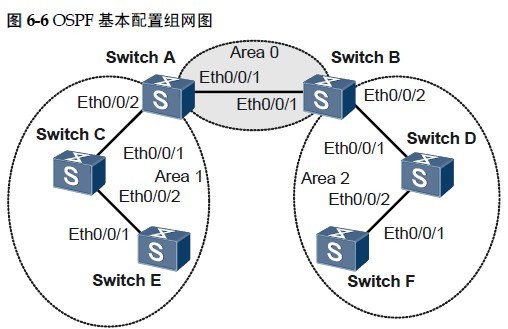
Switch A Ethernet 0/0/1 VLANIF 10 192.168.0.1/24
Switch A Ethernet 0/0/2 VLANIF 20 192.168.1.1/24
Switch B Ethernet 0/0/1 VLANIF 10 192.168.0.2/24
Switch B Ethernet 0/0/2 VLANIF 30 192.168.2.1/24
Switch C Ethernet 0/0/1 VLANIF 20 192.168.1.2/24
Switch C Ethernet 0/0/2 VLANIF 40 172.16.1.1/24
Switch D Ethernet 0/0/1 VLANIF 30 192.168.2.2/24
Switch D Ethernet 0/0/2 VLANIF 50 172.17.1.1/24
Switch E Ethernet 0/0/1 VLANIF 40 172.16.1.2/24
Switch F Ethernet 0/0/1 VLANIF 50 172.17.1.2/24
配置思路
采用如下的思路配置OSPF基本功能:
1. 配置各接口所属VLAN ID。
2. 配置各VLANIF接口的IP地址。
3. 在各Switch设备上使能OSPF,指定不同区域内的网段。
4. 查看路由表及数据库信息。
配置步骤
1. 配置各接口所属的VLAN(略)
2. 配置各VLANIF接口的IP地址(略)
3. 配置OSPF基本功能
# 配置SwitchA。
[SwitchA] router id 1.1.1.1
[SwitchA] ospf
[SwitchA-ospf-1] area 0
[SwitchA-ospf-1-area-0.0.0.0] network 192.168.0.0 0.0.0.255
[SwitchA-ospf-1-area-0.0.0.0] quit
[SwitchA-ospf-1] area 1
[SwitchA-ospf-1-area-0.0.0.1] network 192.168.1.0 0.0.0.255
[SwitchA-ospf-1-area-0.0.0.1] quit
[SwitchA-ospf-1] quit
# 配置SwitchB。
[SwitchB] router id 2.2.2.2
[SwitchB] ospf
[SwitchB-ospf-1] area 0
[SwitchB-ospf-1-area-0.0.0.0] network 192.168.0.0 0.0.0.255
[SwitchB-ospf-1-area-0.0.0.0] quit
[SwitchB-ospf-1] area 2
[SwitchB-ospf-1-area-0.0.0.2] network 192.168.2.0 0.0.0.255
[SwitchB-ospf-1-area-0.0.0.2] quit
[SwitchB-ospf-1] quit
# 配置SwitchC。
[SwitchC] router id 3.3.3.3
[SwitchC] ospf
[SwitchC-ospf-1] area 1
[SwitchC-ospf-1-area-0.0.0.1] network 192.168.1.0 0.0.0.255
[SwitchC-ospf-1-area-0.0.0.1] network 172.16.1.0 0.0.0.255
[SwitchC-ospf-1-area-0.0.0.1] quit
[SwitchC-ospf-1] quit
# 配置SwitchD。
[SwitchD] router id 4.4.4.4
[SwitchD] ospf
[SwitchD-ospf-1] area 2
[SwitchD-ospf-1-area-0.0.0.2] network 192.168.2.0 0.0.0.255
[SwitchD-ospf-1-area-0.0.0.2] network 172.17.1.0 0.0.0.255
[SwitchD-ospf-1-area-0.0.0.2] quit
[SwitchD-ospf-1] quit
# 配置SwitchE。
[SwitchE] router id 5.5.5.5
[SwitchE] ospf
[SwitchE-ospf-1] area 1
[SwitchE-ospf-1-area-0.0.0.1] network 172.16.1.0 0.0.0.255
[SwitchE-ospf-1-area-0.0.0.1] quit
[SwitchE-ospf-1] quit
# 配置SwitchF。
[SwitchF] router id 6.6.6.6
[SwitchF] ospf
[SwitchF-ospf-1] area 2
[SwitchF-ospf-1-area-0.0.0.2] network 172.17.1.0 0.0.0.255
[SwitchF-ospf-1-area-0.0.0.2] quit
[SwitchF-ospf-1] quit
4. 验证配置结果
# 查看SwitchA的OSPF邻居。
[SwitchA] display ospf peer
OSPF Process 1 with Router ID 1.1.1.1
Neighbors
Area 0.0.0.0 interface 192.168.0.1(Vlanif10)'s neighbors
Router ID: 2.2.2.2 Address: 192.168.0.2
State: Full Mode:Nbr is Master Priority: 1
DR: 192.168.0.1 BDR: 192.168.0.2 MTU: 0
Dead timer due in 36 sec
Retrans timer interval: 5
Neighbor is up for 00:15:04
Authentication Sequence: [ 0 ]
Neighbors
Area 0.0.0.1 interface 192.168.1.1(Vlanif20)'s neighbors
Router ID: 3.3.3.3 Address: 192.168.1.2
State: Full Mode:Nbr is Master Priority: 1
DR: 192.168.1.1 BDR: 192.168.1.2 MTU: 0
Dead timer due in 39 sec
Retrans timer interval: 5
Neighbor is up for 00:07:32
Authentication Sequence: [ 0 ]
# 显示SwitchA的OSPF路由信息。
[SwitchA] display ospf routing
OSPF Process 1 with Router ID 1.1.1.1
Routing Tables
Routing for Network
Destination Cost Type NextHop AdvRouter Area
172.16.1.0/24 2 Transit 192.168.1.2 3.3.3.3 0.0.0.1
172.17.1.0/24 3 Inter-area 192.168.0.2 2.2.2.2 0.0.0.0
192.168.0.0/24 1 Transit 192.168.0.1 1.1.1.1 0.0.0.0
192.168.1.0/24 1 Transit 192.168.1.1 1.1.1.1 0.0.0.1
192.168.2.0/24 2 Inter-area 192.168.0.2 2.2.2.2 0.0.0.0
Total Nets: 5
Intra Area: 3 Inter Area: 2 ASE: 0 NSSA: 0
# 查看SwitchA的LSDB。
[SwitchA] display ospf lsdb
OSPF Process 1 with Router ID 1.1.1.1
Link State Database
Area: 0.0.0.0
Type LinkState ID AdvRouter Age Len Sequence Metric
Router 2.2.2.2 2.2.2.2 317 48 80000003 1
Router 1.1.1.1 1.1.1.1 316 48 80000002 1
Network 192.168.0.1 1.1.1.1 316 32 80000001 0
Sum-Net 172.16.1.0 1.1.1.1 250 28 80000001 2
Sum-Net 172.17.1.0 2.2.2.2 203 28 80000001 2
Sum-Net 192.168.2.0 2.2.2.2 237 28 80000002 1
Sum-Net 192.168.1.0 1.1.1.1 295 28 80000002 1
Area: 0.0.0.1
Type LinkState ID AdvRouter Age Len Sequence Metric
Router 5.5.5.5 5.5.5.5 214 36 80000004 1
Router 3.3.3.3 3.3.3.3 217 60 80000008 1
Router 1.1.1.1 1.1.1.1 289 48 80000002 1
Network 192.168.1.1 1.1.1.1 202 28 80000002 0
Network 172.16.1.1 3.3.3.3 670 32 80000001 0
Sum-Net 172.17.1.0 1.1.1.1 202 28 80000001 3
Sum-Net 192.168.2.0 1.1.1.1 242 28 80000001 2
Sum-Net 192.168.0.0 1.1.1.1 300 28 80000001 1
# 查看SwitchD的路由表,并使用Ping进行测试连通性。
[SwitchD] display ospf routing
OSPF Process 1 with Router ID 4.4.4.4
Routing Tables
Routing for Network
Destination Cost Type NextHop AdvRouter Area
172.16.1.0/24 4 Inter-area 192.168.2.1 2.2.2.2 0.0.0.2
172.17.1.0/24 1 Transit 172.17.1.1 4.4.4.4 0.0.0.2
192.168.0.0/24 2 Inter-area 192.168.2.1 2.2.2.2 0.0.0.2
192.168.1.0/24 3 Inter-area 192.168.2.1 2.2.2.2 0.0.0.2
192.168.2.0/24 1 Transit 192.168.2.2 4.4.4.4 0.0.0.2
Total Nets: 5
Intra Area: 2 Inter Area: 3 ASE: 0 NSSA: 0
[SwitchD] ping 172.16.1.1
PING 172.16.1.1: 56 data bytes, press CTRL_C to break
Reply from 172.16.1.1: bytes=56 Sequence=1 ttl=253 time=62 ms
Reply from 172.16.1.1: bytes=56 Sequence=2 ttl=253 time=16 ms
Reply from 172.16.1.1: bytes=56 Sequence=3 ttl=253 time=62 ms
Reply from 172.16.1.1: bytes=56 Sequence=4 ttl=253 time=94 ms
Reply from 172.16.1.1: bytes=56 Sequence=5 ttl=253 time=63 ms
--- 172.16.1.1 ping statistics ---
5 packet(s) transmitted
5 packet(s) received
0.00% packet loss
round-trip min/avg/max = 16/59/94 ms
配置文件下载地址:
http://pan.baidu.com/share/link?shareid=400066&uk=2332071257
不能下载请告诉我,QQ:378254296 . 留下你的邮箱我会发给你。
