




本次以CISCO四台2811路由器作为介绍:
组网图如下:
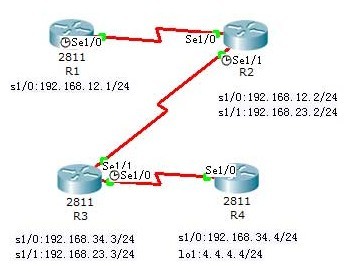
配置步骤:
步骤1:按拓扑图配置好各路由器的主机名和显示名,包括回环口 IP 地址和串口 IP 地址。
步骤2:配置各个路由的基本设置
配置R1 路由器
R1#conf t
Enter configuration commands, one per line. End with CNTL/Z.
R1(config)#router eigrp 1
R1(config-router)#no auto-summary //禁止自动汇总
R1(config-router)#network 1.1.1.0 0.0.0.255 //回环口网络
R1(config-router)#network 192.168.12.0 //串行口网络
R1(config-router)#exit
%SYS-5-CONFIG_I: Configured from console by console
R1(config)#int s1/0
R1(config-if)#bandwidth 128
配置R2路由器:
R2#conf t
Enter configuration commands, one per line. End with CNTL/Z.
R2(config)#router eigrp 1
R2(config)#no auto-summary
R2(config-router)#network 192.168.12.0
R2(config-router)#network 192.168.23.0
R2(config-router)#exit
R2(config)# int s1/0
R2(config-if)#bandwidth 128
配置R3路由器:
R3#conf t
Enter configuration commands, one per line. End with CNTL/Z.
R3(config)#router eigrp 1
R3(config-router)#no auto-summary
R3(config-router)#network 192.168.23.0
R3(config-router)#network 192.168.34.0
R3(config-router)#end
%SYS-5-CONFIG_I: Configured from console by console
R3#
配置R4路由器:
R4(config)#router eigrp 1
R4(config-router)#no auto-summary
R4(config-router)#network 4.4.4.0 0.0.0.255
R4(config-router)#network 192.168.34.0
R4(config-router)#end
%SYS-5-CONFIG_I: Configured from console by console
R4#
注意事项:
EIGRP 协议在通告网段时,如果是主类网络(即标准A、B、C 类的网络,或者说没有划分子网的网络),输入此网络地址即可。如果是子网的话,则最好在网络号后面写通配符掩码(反掩码) ,这样可以避免将所有的子网都加入EIGRP进程中。通配符掩码是用广播地址(255.255.255.255)减去子网掩码所得到。如掩码地址是 255.255.248.0,则反掩码地址是0.0.7.255。运行EIGRP 的整个网络AS 号码必须一致,其范围为 1-65535之间。
步骤3:在R2 上验证路由表
R2#sh ip route
Codes: C - connected, S - static, I - IGRP, R - RIP, M - mobile, B - BGP
D - EIGRP, EX - EIGRP external, O - OSPF, IA - OSPF inter area
N1 - OSPF NSSA external type 1, N2 - OSPF NSSA external type 2
E1 - OSPF external type 1, E2 - OSPF external type 2, E - EGP
i - IS-IS, L1 - IS-IS level-1, L2 - IS-IS level-2, ia - IS-IS inter area
* - candidate default, U - per-user static route, o - ODR
P - periodic downloaded static route
Gateway of last resort is not set
1.0.0.0/24 is subnetted, 1 subnets
D 1.1.1.0 [90/20640000] via 192.168.12.1, 00:28:38, Serial1/0
4.0.0.0/24 is subnetted, 1 subnets
D 4.4.4.0 [90/2809856] via 192.168.23.3, 00:00:33, Serial1/1
C 192.168.12.0/24 is directly connected, Serial1/0
C 192.168.23.0/24 is directly connected, Serial1/1
D 192.168.34.0/24 [90/2681856] via 192.168.23.3, 00:00:33, Serial1/1
R2#
注意:以上输出表明路由器 R2 通过 EIGRP 学到了 3 条 EIGRP 路由条目,管理距离是90,注意 EIGRP 协议代码用字母“D”表示,通过重分布方式进入EIGRP网络的路由条目, 默认管理距离为170,路由代码用“D EX”表示。
EIGRP 度量值的计算公式=[ K1 * Bandwidth + (K2 * Bandwidth)/(256-Load) + K3*Delay ]*[K5/(Reliability + K4) ] *256
默认情况下,K1 = K3 = 1,K2 = K4 = K5 = 0 。
Bandwidth =107/所经由链路中入口带宽(单位为 Kbps)的最小值
Delay=所经由链路中入口的延迟之和(单位为 µs)/10
路由器 R2中的“1.1.1.0”路由条目的度量值是如何计算的?
首先看带宽应该是从 R1 的 Loopback0 到 R2 最小的,应该是R2 的s1/0接口的带宽,为128K,而延迟是路由器R1 的Loopback0 和路由器 R2 的s1/0 接口的延迟之和,所以最后的度量值应该是
[107/128+(5000+20000)/10]*256=20640000,和路由器计算的结果是一致 的。
(接口的带宽和延迟可以通过“show interface”命令来查看)
步骤4:在R2 上验证 EIGRP 路由协议
R2#sh ip protocols
Routing Protocol is "eigrp 1 " //AS 号码为1
Outgoing update filter list for all interfaces is not set
Incoming update filter list for all interfaces is not set
Default networks flagged in outgoing updates
Default networks accepted from incoming updates
EIGRP metric weight K1=1, K2=0, K3=1, K4=0, K5=0 //显示计算度量值所用的 K 值
EIGRP maximum hopcount 100 //EIGRP 支持的最大跳数
EIGRP maximum metric variance 1 //variance 值默认为 1,即默认时只支持等价路径的负载均衡
Redistributing: eigrp 1
Automatic network summarization is not in effect
//显示自动汇总已经关闭,默认自动汇总是开启的
Maximum path: 4
Routing for Networks:
192.168.12.0
192.168.23.0
Routing Information Sources:
Gateway Distance Last Update
192.168.23.3 90 3530000
192.168.12.1 90 7812425
Distance: internal 90 external 170
R2#
步骤5:在R2 上验证 EIGRP 邻居
R2#sh ip eigrp neighbors
IP-EIGRP neighbors for process 1
H Address Interface Hold Uptime SRTT RTO Q Seq
(sec) (ms) Cnt Num
0 192.168.23.3 Se1/1 11 01:33:12 40 1000 0 18
1 192.168.12.1 Se1/0 12 00:21:50 40 1000 0 18
R2#
//以上输出各字段的含义如下:
H: 表示与邻居建立会话的顺序;
Address: 邻居路由器的接口地址;
Interface: 本地到邻居路由器的接口;
Hold: 认为邻居关系不存在所能等待的最大时间;
Uptime: 从邻居关系建立到目前的时间;
RTT: 是向邻居路由器发送一个数据包以及本路由器收到确认包的时间;
RTO: 路由器在重新传输包之前等待 ACK的时间;
Q Cnt: 等待发送的队列;
Seq Num: 从邻居收到的发送数据包的序列号。
运行EIGRP 路由协议的路由器不能建立邻居关系的可能原因:
EIGRP 进程的 AS 号码不同
计算度量值的 K 值不同
步骤6:在R2 上验证 EIGRP 拓扑表
R2#sh ip eigrp topology
IP-EIGRP Topology Table for AS 1
Codes: P - Passive, A - Active, U - Update, Q - Query, R - Reply,
r - Reply status
P 192.168.12.0/24, 1 successors, FD is 20512000
via Connected, Serial1/0
P 192.168.23.0/24, 1 successors, FD is 2169856
via Connected, Serial1/1
P 192.168.34.0/24, 1 successors, FD is 2681856
via 192.168.23.3 (2681856/2169856), Serial1/1
P 4.4.4.0/24, 1 successors, FD is 2809856
via 192.168.23.3 (2809856/2297856), Serial1/1
P 1.1.1.0/24, 1 successors, FD is 20640000
via 192.168.12.1 (20640000/128256), Serial1/0
R2#
注意:以上输出可以清楚地看到每条路由条目的 FD和AD的值。拓扑结构数据库中状态代码最常见的是“P”,“A”和“s”,含义如下:
P:代表passive,表示网络处于收敛的稳定状态;
A:代表active,当前网络不可用,正处于发送查询状态;
S:在3分钟内,如果被查询的路由没有收到回应,查询的路由就被置为“stuck in active”状态。
可行距离(FD):到达一个目的网络的最小度量值;
通告距离(RD):邻居路由器所通告的它自己到达目的网络的最小的度量值;
可行性条件(FC):是EIGRP 路由器更新路由表和拓扑表的依据。可行性条件可以有效地阻止路由环路,实现路由的快速收敛。可行性条件的公式为:AD<FD。
步骤7:在R2 验证运行 EIGRP 的接口及其流量
R2#sh ip eigrp interfaces
IP-EIGRP interfaces for process 1
Xmit Queue Mean Pacing Time Multicast Pending
Interface Peers Un/Reliable SRTT Un/Reliable Flow Timer Routes
Se1/1 1 0/0 1236 0/10 0 0
Se1/0 1 0/0 1236 0/10 0 0
R2#sh ip eigrp traffic
IP-EIGRP Traffic Statistics for process 1
Hellos sent/received: 3843/3430
Updates sent/received: 18/17
Queries sent/received: 2/0
Replies sent/received: 0/2
Acks sent/received: 19/17
Input queue high water mark 1, 0 drops
SIA-Queries sent/received: 0/0
SIA-Replies sent/received: 0/0
R2#
注意:在EIGRP 中,有五种类型的数据包:
1.Hello:以组播的方式定期发送,用于建立和维持邻居关系;
2.更新:当路由器收到某个邻居路由器的第一个 Hello 包时,以单播传送方式回送一个包含它所知道的路由信息的更新包。当路由信息发生变化时,以组播的方式发送只包含变化信息的更新包;
3.查询:当一条链路失效,路由器重新进行路由计算,但在拓扑表中没有可行的后继路由时,路由器就以组播的方式向它的邻居发送一个查询包,以询问它们是否有一条到目的地的后继路由;
4.答复:以单播的方式回传给查询方,对查询数据包进行应答;
5.确认:以单播的方式传送,用来确认更新、查询、答复数据包。
步骤8:在R2 观察 EIGRP 的调试信息
R2#debug eigrp packets //显示EIGRP 发送和接收的数据包
EIGRP Packets debugging is on
(UPDATE, REQUEST, QUERY, REPLY, HELLO, ACK )
R2#
EIGRP: Sending HELLO on Serial1/0
AS 1, Flags 0x0, Seq 23/0 idbQ 0/0 iidbQ un/rely 0/0
EIGRP: Received HELLO on Serial0/0/1 nbr 192.168.23.3
AS 1, Flags 0x0, Seq 19/0 idbQ 0/0
……
R2#undebug all //关闭调试信息
步骤9:在EIGRP 中观察默认路由的注入
1) 在R1 上修改配置R1#conf t
Enter configuration commands, one per line. End with CNTL/Z.
R1(config)#int lo0
R1(config-if)#no ip addr 1.1.1.1 255.255.255.0
R1(config-if)#ip addr 1.1.1.1 255.0.0.0
R1(config-if)#exit
R1(config)#router eigrp 1
R1(config-router)#no network 1.1.1.0 0.0.0.255
R1(config-router)#network 1.0.0.0 //在EIGRP 中发布默认网络
R1(config-router)#exit
R1(config)#ip default-network 1.0.0.0 //定义默认网络
R1(config)#
2) 在R2观察路由表
R2#sh ip ro
Gateway of last resort is 192.168.12.1 to network 1.0.0.0
D* 1.0.0.0/8 [90/20640000] via 192.168.12.1, 00:01:02, Serial1/0
4.0.0.0/24 is subnetted, 1 subnets
D 4.4.4.0 [90/2809856] via 192.168.23.3, 02:19:26, Serial1/1
C 192.168.12.0/24 is directly connected, Serial1/0
C 192.168.23.0/24 is directly connected, Serial1/1
D 192.168.34.0/24 [90/2681856] via 192.168.23.3, 02:19:26,
Serial0/0/1
R2#
如果你要使用 思科的模拟器请在本站的网络工程目录页面搜索 : ENABLE密码
