




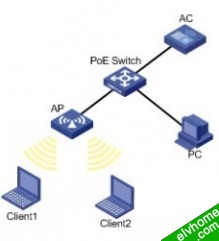
为了限制Client 1接入无线网络的带宽,比如512kbps,需要在AC的相应WLAN-ESS接口上面应用QoS策略,达到限速的目的。
一、组网图
二、配置思路
需要配置以下内容:
》配置无线网络
》根据不同需求,配置QoS策略,并应用到WLAN-ESS接口上
三、使用版本及配置信息
请下载文档查阅:http://pan.baidu.com/s/1y1zSZ
四、验证结果
在AC上验证配置结果:
#查看AP状态,确认AP可以和AC处于连接状态,并且ESS口处于UP状态
<AC>display wlan ap all
Total Number of APs configured: 1
Total Number of APs connected : 1
AP Profiles
--------------------------------------------------------
AP Name APID State Model Serial-ID
--------------------------------------------------------
testap 1 Run WA2100 x028652
--------------------------------------------------------
<AC>
<AC>display brief interface
The brief information of interface(s) under route mode:
Interface Link Protocol-link Protocol type Main IP
M-E1/0/1 UP DOWN ETHERNET --
NULL0 UP UP(spoofing) NULL --
Vlan1 UP UP ETHERNET 101.1.1.1
The brief information of interface(s) under bridge mode:
Interface Link Speed Duplex Link-type PVID
GE1/0/1 UP 1G(a) full(a) access 1
GE1/0/2 DOWN 1G(a) full(a) access 1
WLAN-ESS1 UP -- -- access 1
WLAN-DBSS1:2 UP -- -- access 1
在Client 1上验证,可以连接SSID为”market_department”的无线网络
# 从PC1往Client 1打流量,该流的目的IP地址、MAC地址,为Client 的IP地址、MAC地址;可以看到限速的效果良好。
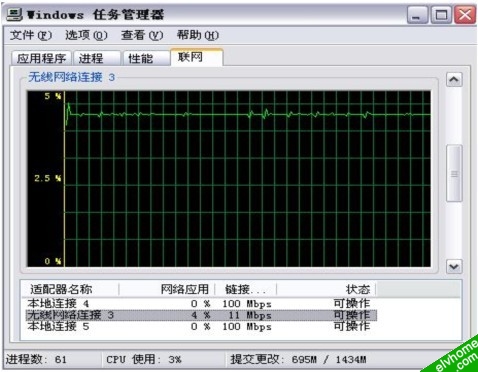
注:因为实验室无线信道繁忙,故速率没有达到512kbps,在AC和AP之间查看报文统计,误差率仅有0.002。
