




一、组网图
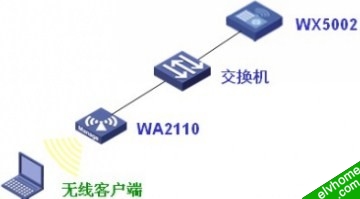
WX5002的IP地址为192.168.1.9,交换机的IP地址为192.168.1.254。
交换机作为二层交换机使用,WX5002和WA2110在同一VLAN。
本例中WA2110的序列号为210235A22W0077000088。
使用的SSID的名称为H3C-PPPoE。
二、wx交换机的配置命令
#
 version 5.20, Release 1106P01
#
 sysname H3C
#
 ip pool 1 192.168.200.10 192.168.200.100
#
 domain default enable system
#
vlan 1
#
domain ppp
 authentication ppp local
 authorization ppp local
 accounting ppp local
 access-limit disable
 state active
 idle-cut disable
 self-service-url disable
 ip pool 1 192.168.200.10 192.168.200.100
domain system
 access-limit disable
 state active
 idle-cut disable
 self-service-url disable
#
local-user h3c
 password simple h3c
 service-type ppp
#
wlan rrm
 dot11a mandatory-rate 6 12 24
 dot11a supported-rate 9 18 36 48 54
 dot11b mandatory-rate 1 2
 dot11b supported-rate 5.5 11
 dot11g mandatory-rate 1 2 5.5 11
 dot11g supported-rate 6 9 12 18 24 36 48 54
#
wlan service-template 1 clear
 ssid H3C-PPPoE
 bind WLAN-ESS 1
 authentication-method open-system
 service-template enable
#
interface Virtual-Template1
 ppp authentication-mode pap domain ppp
 remote address pool 1
 ip address 192.168.200.1 255.255.255.0
#
interface NULL0
#
interface Vlan-interface1
 pppoe-server bind Virtual-Template 1
 ip address 192.168.1.9 255.255.255.0
#
interface GigabitEthernet1/0/1
#
interface GigabitEthernet1/0/2
#
interface M-Ethernet1/0/1
#
interface WLAN-ESS1
#
wlan ap ap1 model WA2100
 serial-id 210235A22W0077000088
 radio 1
  service-template 1
  radio enable
#
user-interface aux 0
user-interface vty 0 4
#
return
客户端配置
1、在无线客户端上选择连接SSID “H3C-PPPoE”
2、使用PPPoE客户端进行PPPoE拨号,用户名“h3c”,密码“h3c”

3、拨号成功后,客户端获取PPPoE地址池中的地址,并可成功ping通192.168.200.1和192.168.1.9
