tip

华为WLAN指导设计 来源:华为星火计划培训

华为WLAN设计
网优网归 场景规划
方案设计

【资料简介】华为Wlan网络网规网优技术、场景规划与方案设计,从0开始设计到交付,一本完完整整的学习教材,建议从事无线学习的同学学习..

马上观看
zon

华为WLAN专题集锦 专题:华为WLAN

WLAN配置
组网模式解析
组网配置案例

【华为无线】本指南详细介绍每个模版的命令解释及用途,在加上十多种精彩案例分享及解释,再加上网优网归,让你彻底脱盲,不在为无线..

马上观看
zon

家园VBook中心 分类:书籍中心

教材 案例 题库
知识 专业认证
资源价值

【中心简介】家园Vbook书籍中心是以收集和整理互联网上优秀书籍,以最好的知识推荐给你学习,让你在学习的路程上事半功倍,告别枯燥,早..

马上观看
tip

华为HCIE认证之路 分类:华为认证

HCIE学习之路
华为 路由 交换
含金量最大的资料

【学习介绍】在中国拥有一张证书不是梦,冰冻三尺,非一日之寒,要拥有一张认证所具备含金量技术水准那是需要多年的经年积累,本书专为你分享..

马上观看
tip

华三无线专题报告 发布:建哥哥

华三
H3C WLAN AC
无线专题

【资料简介】大好河山、无线风光,主要介绍H3C无线,从基础到高级配置及组网模式配置案例,多达200篇案例配置,从此告别对无线的迷茫..

马上观看
★浏览次数:539 次★  发布日期:2013-10-21
 当前位置:技术资料 > 网络工程 > H3C > 正文
 
最近更新
    正在更新...
 

H3C WX系列AC+Fit AP 802.1x无线认证和IAS配合


802.1x协议仅仅提供了一种用户接入认证的手段,并简单地通过控制接入端口的开/关状态来实现,这种简化适用于无线局域网的接入认证、点对点物理或逻辑端口的接入认证,而在可运营、可管理的宽带IP城域网中作为一种认证方式具有极大的局限性


H3C WX系列AC+Fit AP 802.1x无线认证和CAMS配合

http://www.elvhome.com/html/2013-5-31/201353116323283910.html


一、组网需求

本配置举例中的AC使用的是WX5002无线控制器,AP使用的是WA2100无线局域网接入点。AC的IP地址为192.168.1.50/24,Radius Server的IP地址为8.1.1.4/8,AP和Client通过DHCP服务器获取IP地址。

本典型配置举例简化组网为两台PC(Client)以及一台Fit AP和无线控制器AC通过IP网络相连。
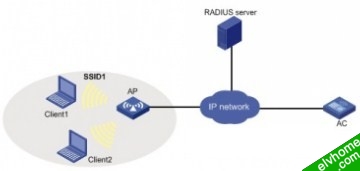
 802.1X无线认证和IAS配合组网图

配置步骤

配置802.1X:
<AC>display current-configuration                                           
#                                                                               
 version 5.00, 0001                                                            
#                                                                               
 sysname AC                                                                
#                                                                               
 configure-user count 1                                                        
#                                                                               
 domain default enable ias                                                    
#                                                                               
 port-security enable                                                          
#                                                                               
 dot1x authentication-method eap                                               
#                                                                               
vlan 1                                                                         
#                                                                               
vlan 2 to 4094                                                                 
#                                                                               
radius scheme system                                                           
 primary authentication 127.0.0.1                                              
 primary accounting 127.0.0.1                                                  
 key authentication h3c                                                        
 key accounting h3c                                                            
 accounting-on enable                                                          
radius scheme ias                                                             
 server-type extended                                                          
 primary authentication 8.20.1.2                                                
 primary accounting 8.20.1.2                                                    
 key authentication h3c                                                        
 key accounting h3c                                                            
timer realtime-accounting 3                                                   
 user-name-format without-domain                                               
 undo stop-accounting-buffer enable                                            
 accounting-on enablee                                                         
#                                                                               
domain ias                                                                    
 authentication default radius-scheme ias                                     
 authorization default radius-scheme ias                                      
 accounting default radius-scheme ias                                         
 access-limit disable                                                          
 state active                                                                  
 idle-cut disable                                                              
 self-service-url disable                                                      
domain system                                                                  
 access-limit disable                                                          
 state active                                                                  
 idle-cut disable                                                              
 self-service-url disable                                                      
#                                                                               
wlan radio-policy rp                                                           
 beacon-interval 500                                                           
#                                                                               
wlan service-template 2 crypto                                                 
 ssid h3c-dot1x                                                                
 bind WLAN-ESS 2                                                               
 authentication-method open-system                                             
 cipher-suite ccmp                                                             
 security-ie rsn                                                               
 gtk-rekey method time-based 180                                               
 service-template enable                                                       
#                                                                               
interface NULL0                                                                
#                                                                               
interface Vlan-interface1                                                      
 ip address 192.168.1.50 255.255.255.0                                         
#                                                                               
interface GigabitEthernet1/0/1                                                 
#                                                                               
interface GigabitEthernet1/0/2                                                 
#                                                                               
interface M-Ethernet1/0/1                                                      
#                                                                               
interface WLAN-ESS2
 port-security port-mode userlogin-secure-ext
 port-security tx-key-type 11key
#                                                                                       
wlan ap ap3 model WA2100                                                       
  serial-id Rock                                                                
  radio 1 type 11g                                                              
  radio-policy rp                                                              
  service-template 2                                                           
  radio enable                                                                 
#                                                                               
 ip route-static 0.0.0.0 0.0.0.0 192.168.1.1                                   
#       

4.4.1  主要配置步骤
1. 在802.1X接入端配置802.1X和认证
# 启用port-security,配置802.1X认证方式为EAP
[AC]port-security enable                                                   
[AC]dot1x authentication-method eap  
# 配置认证策略                                     
[AC]radius scheme ias                                               
[AC-radius-cams]server-type extended                                       
[AC-radius-cams]primary authentication 8.20.1.2                             
[AC-radius-cams]primary accounting 8.20.1.2                                 
[AC-radius-cams]key authentication h3c                                     
[AC-radius-cams]key accounting h3c                                         
[AC-radius-cams]timer realtime-accounting 3                                
[AC-radius-cams]user-name-format without-domain                            
[AC-radius-cams]undo stop-accounting-buffer enable                         
[AC-radius-cams]accounting-on enable                                     

# 配置认证域                                     
[AC-radius-cams]domain ias                                                
[AC-isp-ias]authentication default radius-scheme ias                     
[AC-isp-ias]authorization default radius-scheme ias                      
[AC-isp- ias]accounting default radius-scheme ias                         
# 把配置的认证域CAMS设置为系统缺省域                                     
[AC-isp-cams]domain default enable ias                                    
# 配置射频策略                                                       
[AC]wlan radio-policy rp                                                   
[AC-wlan-rp-rp]beacon-interval 500                                         

# 配置无线接口,认证方式为EAP
[AC-wlan-rp-rp]interface WLAN-ESS2                                          
[AC-WLAN-ESS2]port-security port-mode userlogin-secure-ext                 
[AC-WLAN-ESS2]port-security tx-key-type 11key  
# 配置无线服务模板                                                       
[AC-wlan-rp-rp]wlan service-template 2 crypto                               
[AC-wlan-st-2]ssid h3c-dot1x                                               
[AC-wlan-st-2]bind WLAN-ESS 2                                              
[AC-wlan-st-2]authentication-method open-system 
[AC-wlan-st-2] cipher-suite ccmp
[AC-wlan-st-2] security-ie rsn
[AC-wlan-st-2]service-template enable      

# 配置Fit AP                              
[AC-WLAN-ESS2]wlan ap ap3 model WA2100                                     
[AC-wlan-ap-ap3]serial-id Rock                                             
[AC-wlan-ap-ap3]radio 1 type 11g                                           
[AC-wlan-ap-ap3-radio-1]radio-policy rp                                    
[AC-wlan-ap-ap3-radio-1]service-template 2                                 
[AC-wlan-ap-ap3-radio-1]radio enable                                       

# 配置VLAN虚接口                                               
[AC-wlan-ap-ap3-radio-1]interface Vlan-interface1                          
[AC-Vlan-interface1]ip address 192.168.1.50 255.255.255.0                  
# 配置缺省路由                                                  
[AC-Vlan-interface1]ip route-static 0.0.0.0 0.0.0.0 192.168.1.1

2. 在IAS上配置802.1X认证项:
配置Radius客户端:
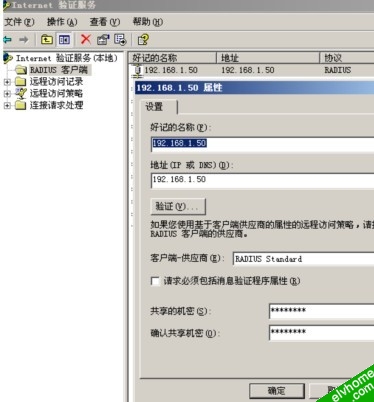
 
ias上的802.1x认证域

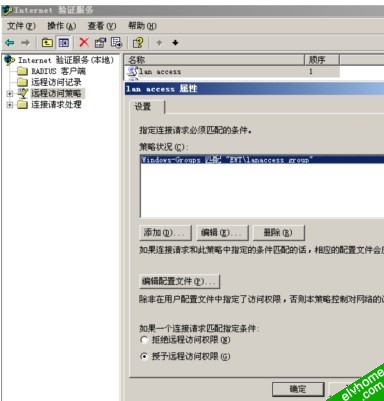
配置远程访问策略:

配置远程访问策略

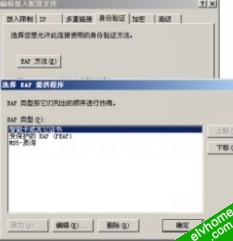
编辑拨入配置文件:

拨入配置

IAS相关的其他配置(比如采用证书认证时需要的证书、AD中的用户等)这里不再详细说明,请参考windows相关帮助文档

注意事项
(1)        如果采用EAP-TLS/EAP-PEAP认证,需要IAS服务器上有服务器验证证书。

(2)        还需要在AD中配置认证用户,并允许该用户远程拨入(windows创建一个用户后,缺省是禁止拨入的)。

相关配置请参考windows IAS配置说明。

 
建议使用IE8.0以上版本解析 网络QQ群:30573676 家园群:36740144 Elv home systems. 蜀ICP备20009373号 © All Rights Reserved 2012 - By badulip
×

扫二维码,关注微信公众号