




说明:
Load Balance是对同一AC上的AP之间进行负载均衡,有两种方式,一种是基于用户数量,另一种是基于AP的流量。当某台AC达到了负载均衡的条件,再有Client试图连接它时,就会拒绝请求,Client就会去连接另一台AP。当同一台AC上有多个AP为用户提供同样的服务时,为了避免某一个AP负载过重,就可以进行负载均衡。
基于用户的负载均衡
http://www.elvhome.com/html/2013-10-21/2013102111392298218.html
基于流量的负载均衡
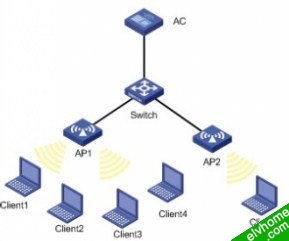
如下图所示,Client 1、Client 2、Client 3和Client 4已经和AP1连接,Client 5试图和AP1连接。
配置AC
1. 配置信息
[AC]display current-configuration
#
version 5.20, Ess 2106P01
#
sysname AC
#
domain default enable system
#
vlan 1
#
vlan 10
domain system
access-limit disable
state active
idle-cut disable
self-service-url disable
#
dhcp server ip-pool 25
network 25.0.0.0 mask 255.0.0.0
#
dhcp server ip-pool 28
network 28.0.0.0 mask 255.0.0.0
#
wlan rrm
11a mandatory-rate 6 12 24
11a supported-rate 9 18 36 48 54
11b mandatory-rate 1 2
11b supported-rate 5.5 11
11g mandatory-rate 1 2 5.5 11
11g supported-rate 6 9 12 18 24 36 48 54
load-balance traffic 10
#
wlan service-template 1 clear
ssid h3c-clear
bind WLAN-ESS 1
authentication-method open-system
service-template enable
#
interface NULL0
#
interface Vlan-interface1
ip address 25.1.1.1 255.0.0.0
#
interface Vlan-interface10
ip address 28.1.1.1 255.0.0.0
#
interface M-GigabitEthernet2/0/1
#
interface Ten-GigabitEthernet2/0/1
port link-type hybrid
port hybrid vlan 1 to 10 tagged
#
interface WLAN-ESS1
port access vlan 10
#
wlan ap ap1 model WA2100
serial-id 210235A22W0079000238
radio 1 type 11g
channel 6
service-template 1
radio enable
#
wlan ap ap2 model WA2100
serial-id 210235A22W0079000239
radio 1 type 11g
channel 6
service-template 1
radio enable
#
dhcp enable
#
return
2. 主要配置步骤
<AC>system-view
[AC]wlan rrm
[AC-wlan-rrm]load-balance traffic 10
4.4 验证结果
》 Client 1、Client 2关联到AP1,可以通过从Client 1向Client 2打流使AP1上流量大于的17M(系统默认当AP1的流量达到门限值30*10%=3M,且比AP2多30*50%=15M,其中30为系统认为AP的最大吞吐率为30M.)(发送流量的工具可以使用IxChariot).。
》 AP2上数据流量为0。
》 Client 5试图关联到AP1被拒绝,Client 5最终关联到了AP2上。
