




一、组网需求
PC和Client属于同一VLAN,Client试图连接Rouge AP ap1,PC不停的Ping Client。Monitor AP ap2通过不断的监听空口报文,发现Rogue AP ap1,并发起攻击。
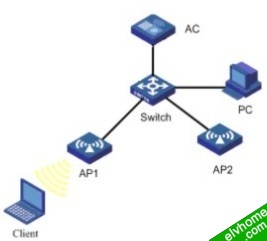
配置AC
1. 配置信息
[AC]display current-configuration
#
version 5.20, Ess 2106P01
#
sysname AC
#
tcp window 3
#
domain default enable system
#
vlan 1
#
vlan 10
#
domain system
access-limit disable
state active
idle-cut disable
self-service-url disable
#
dhcp server ip-pool 25
network 25.0.0.0 mask 255.0.0.0
#
dhcp server ip-pool 28
network 28.0.0.0 mask 255.0.0.0
#
wlan rrm
11a mandatory-rate 6 12 24
11a supported-rate 9 18 36 48 54
11b mandatory-rate 1 2
11b supported-rate 5.5 11
11g mandatory-rate 1 2 5.5 11
11g supported-rate 6 9 12 18 24 36 48 54
#
wlan service-template 1 clear
ssid h3c-clear
bind WLAN-ESS 1
authentication-method open-system
service-template enable
#
interface NULL0
#
interface LoopBack0
#
interface Vlan-interface1
ip address 25.1.1.1 255.0.0.0
#
interface Vlan-interface10
ip address 28.1.1.1 255.0.0.0
#
interface M-GigabitEthernet2/0/1
#
interface Ten-GigabitEthernet2/0/1
port link-type hybrid
port hybrid vlan 1 to 10 tagged
#
interface WLAN-ESS1
port access vlan 10
#
wlan ap ap1 model WA2100
serial-id wcma
radio 1 type 11g
channel 6
service-template 1
radio enable
#
wlan ap ap2 model WA2100
serial-id 210235A22W0079000239
work-mode monitor
radio 1 type 11g
channel 6
service-template 1
radio enable
#
wlan ids
countermeasures enable
device permit ssid h3c
#
dhcp enable
#
naturemask-arp enable
#
user-interface con 0
user-interface vty 0 4
authentication-mode none
user privilege level 3
history-command max-size 256
idle-timeout 0 0
#
return
2. 主要配置步骤
<AC>system-view
[AC]wlan ap ap2
[AC-wlan-ap-ap2]work-mode monitor
[AC-wlan-ap-ap2]radio 1
[AC-wlan-ap-ap2-radio-1]radio enable
[AC]wlan ids
[AC-wlan-ids]device permit ssid h3c
[AC-wlan-ids]countermeasures enable
验证结果
通过命令可以查看到Monitor AP发现的Rouge AP.
[AC-wlan-ids]display wlan ids detected all
Total Number of Entries : 7
Flags: r = rogue, i = ignore, a = adhoc, w = ap, c = client
#AP = number of active APs detecting, Ch = channel number
Detected Device(s) List
--------------------------------------------------------------------------
MAC Address Vendor Type #AP Ch Last Detected SSID
--------------------------------------------------------------------------
000f-e263-c914 Hangzhou H.. r--w- 1 153 2006-01-20/11:26:12 "h3c-clear"
000f-e263-c918 Hangzhou H.. -i-w- 1 153 2006-01-20/11:26:12 "test2"
000f-e2cc-ff08 Hangzhou H.. r---c 1 153 2006-01-20/11:25:40 -
--------------------------------------------------------------------------
其中Type前面有r的表示是Rogue设备。
Client试图连接AP1并和PC通信,通信时断时续。
C:\Documents and Settings\h3c>ping 21.1.1.1 -t
Pinging 21.1.1.1 with 32 bytes of data:
Request timed out.
Request timed out.
Request timed out.
Request timed out.
Request timed out.
Reply from 21.1.1.1: bytes=32 time=1433ms TTL=255
Reply from 21.1.1.1: bytes=32 time=40ms TTL=255
Reply from 21.1.1.1: bytes=32 time=11ms TTL=255
Reply from 21.1.1.1: bytes=32 time=46ms TTL=255
Reply from 21.1.1.1: bytes=32 time=17ms TTL=255
Requser timed out.
Requser timed out.
